Free resources for teachers, educational ideas and tips, educational topics, Personal Learning Networks, Project Based Learning, Google, Evernote, Discovery Education and more.
Pages
- Home
- Google for Education Resources
- STEM Resources
- Evernote for Education
- My Favorite Resources for Teachers and Students
- Create a Personal Learning Network
- Android for Education
- Discovery Education Resources
- Project Based Learning
- Advertise on this site
- About the author and blog
- Speaking and Consulting Services
Showing posts with label CAD. Show all posts
Thursday, July 30, 2015
3D CAD and 3D Printing with Chromebooks
Everyone who reads this blog knows I'm a huge fan of Chromebooks, especially for education. One area that I get asked about often is 3D CAD and 3D Printing. So here is some info. I am by no means an expert on 3D printing though.
Tinkercad is a completely web-based, 3D CAD system that works on Chromebooks. I've used it and found it easy to use and pretty powerful (and I've used systems like CATIA, Pro-Engineer and SolidWorks). You can easily download the STL file to use with the 3D printer. Tinkercad also has some great resources to help you learn how to use it.
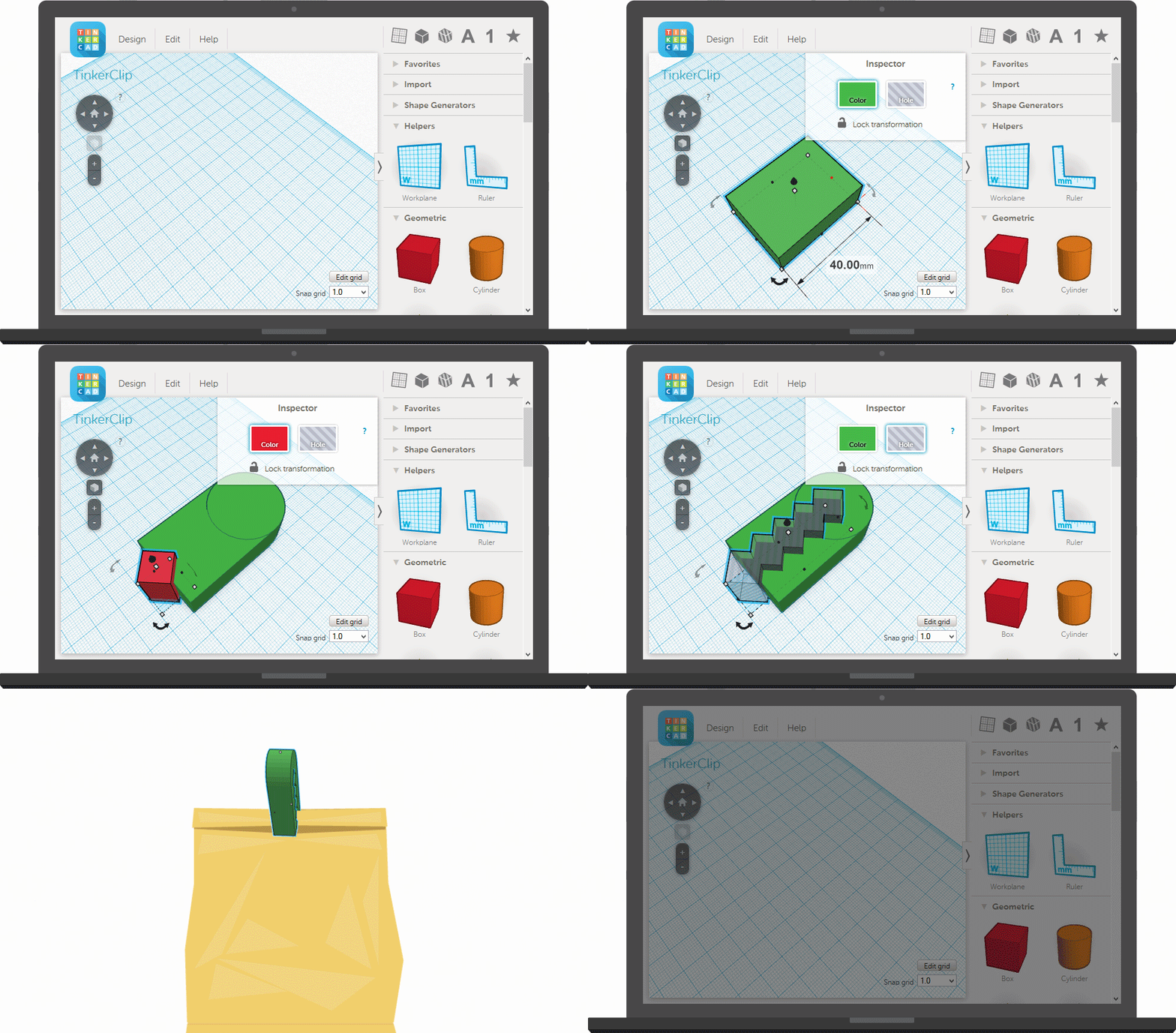
I haven't found a 3D printer that would work directly from a Chromebook, but even Windows laptop schools connect a powerful desktop to their 3D printer to do the rendering and printing and allow the student to use their device for other things while the job runs. Some printers even have built in support for accessing files from media devices like flash drives so you can print direct.
So, students can do their designs on the Chromebooks, and then the files can be accessed on the desktop PC and printed on the 3D printer.
Two more things Chromebooks can do!
Related:
What can you do on a Chromebook? Pretty much everything.
Labels:
3d,
CAD,
chromebooks,
printer,
STEM
Wednesday, December 3, 2014
Autodesk offers free software to all students and schools

Autodesk, make of AutoCAD and other CAD and design software titles, is now offering AutoCAD and Fusion 360 free for education use. Students can use it at home and at school, giving them and teachers new tools for them to use in some great projects.
The education page, http://www.autodesk.com/education/home, has the download links, as well as resources, training tips, help and support, and more.
Related:
STEM Resources for Educators
LibreCAD - free, 2D CAD Software for Windows, OSX, and Linux
My Top 10 Free Google Resources for Education - includes Google Sketchup 3D modeling software.
NASA 3D Resources - fun and educational - includes downloadable models to use in CAD.
Monday, April 30, 2012
Tinkercad - web based, free CAD app

Tinkercad is a free, web based, CAD app that runs in your browser (need webGL enabled). It's easy to use and has some great features. Many CAD systems that engineers use are very complicated with thousands of features (I've used CATIA, ProEngineer, AutoCad, Cadkey) that students won't need.
Tinkercad allows you to create 3D models of pretty much anything, and even export them to 3D printers. The site has a getting started page that walks you through how to use it.
There is also a community of users for support and help.
This is a great resource for students and teachers to use in STEM Classes, or any class for that matter, to draw 3D models.

Related:
Google Sells SketchUp 3D modeling software - promises free educational version to continue
SketchUp for Education Site
Google Resources for Education
STEM Resources for Students and Educators
LibreCAD - free, 2D CAD Software for Windows, OSX, and Linux
Free Academic Program (incl CAD software) from PTC
Labels:
CAD,
engineering,
free resources,
STEM
Friday, April 27, 2012
Google Sells SketchUp 3D modeling software - promises free educational version to continue

Google has just announced that is has sold SketchUp, it's popular 3D modeling software, to Trimble, a mapping, surveying and navigation equipment company. Google had purchased SketchUp in 2006. Many schools use SketchUp in their classes, having students design everything from floor plans, to buildings to project drawings and more.
Google is moving towards a "leaner, more focused company" and has been shutting down some services and moving functions into other services or just shutting it down completely. Picasa was recently shut down, having much of its feature set moved to Google+.
As far as Educators using Sketchup, it looks like there will still be a free version of SketchUp available. According to Google:
If you’re one of the many, many people who use SketchUp for something else—from education to woodworking, geo-modeling to movie-making—rest assured that there will be a SketchUp for you, too. Our mission has always been to make 3D modeling tools that anyone can use. The free version of SketchUp is an important part of our world as well, and that isn’t changing in the least.

As of this writing, I was still able to download and install the educational version (K12) of SketchUp.
This is an incredible tool for students and educators to use and I really hope Trimble and/or Google keeps the free educational version going for a long time.
Sources: TechCrunch and the Official Google SketchUp Blog
Related:
SketchUp for Education Site
Google Resources for Education
STEM Resources for Students and Educators
LibreCAD - free, 2D CAD Software for Windows, OSX, and Linux
10 Important Skills Students need for the Future
Technology in use in Engineering
Some More Ideas for getting students engaged in STEM subjects
Science and Engineering Visualization Challenge - great STEM opportunity
How to Turn a Teen Into an Engineer
TryEngineering - engineering simulations and info on engineering
Project Based Learning resources for Educators
Labels:
CAD,
free resources,
google
Monday, March 5, 2012
Free Academic Program (incl CAD software) from PTC

This free program is a great way to engage students in STEM skills and teach them technology skills (CAD) through the competitions and project based learning. They will also learn valuable skills for the future through these kinds of programs.
Contact them for more information: http://www.ptc.com/appserver/wcms/forms/index.jsp?&im_dbkey=121302&icg_dbkey=482
Check out FREE CAD videos, design competitions, and so much more on the PTC Academic Program Facebook Page.
I've used Pro-Engineer as an engineer. It is an excellent program and PTC provides excellent support.
About PTC
PTC is the leading technology provider in product development software. We provide Product Lifecycle Management solutions to over 27,000 companies in the Industrial, High Tech, Automotive, Aerospace and Defense, Consumer, and Medical Device industries.
Passionate about Education
For more than ten years, our team of engineers and educators have been working with schools to enhance the teaching and learning of science, technology, engineering and math (STEM) education. PTC believes that the sustained success of our company, our customers, and society depends on empowering each generation to solve real world economic, social, and environmental challenges.
(Thanks to Dolores Gende, @dgende, for the tip)
Related:
STEM Resources for Educators
LibreCAD - free, 2D CAD Software for Windows, OSX, and Linux
My Top 10 Free Google Resources for Education - includes Google Sketchup 3D modeling software.
NASA 3D Resources - fun and educational - includes downloadable models to use in CAD.
Some More Ideas for getting students engaged in STEM subjects
Science and Engineering Visualization Challenge - great STEM opportunity
How to Turn a Teen Into an Engineer
TryEngineering - engineering simulations and info on engineering
Labels:
CAD,
engineering,
free resources,
STEM
Friday, March 2, 2012
LibreCAD - free, 2D CAD Software for Windows, OSX, and Linux

LibreCAD is a free, open source, CAD application that is available for Windows, Apple, and Linux.
LibreCAD is a 2D Computer Aided Design application that has all the features you would expect in a 2D CAD system. It is available in over 20 different languages and for Windows, Mac, and multiple Linux distributions.
It is easy to use, with an intuitive menu and user interface.
This is a great resource for students and teachers to use. Some of my students used it to design their bridges for our bridge project.
Related/Similar:
My Top 10 Free Google Resources for Education - includes Google Sketchup 3D modeling software.
Subscribe to:
Posts (Atom)