Here are some interactive whiteboard resources that I have collected.

Here are some great resources for learning how to use an Interactive WhiteBoard (IWB), and ideas for using it with your students to help them learn.
Here are three main types of Interactive Whiteboards:
SmartBoards
http://education.smarttech.com/?WT.ac=homepage_ed Mimios
http://www.mimio.com/en-NA.aspxEno Boards
http://www.steelcase.com/en/products/category/educational/classroom-technology/eno/pages/overview.aspxThe IWB is the board itself. There is also a projector that projects the image from your computer.
Basic Care and Handling:
- do not use tape or markers on the IWB (you can use Dry Erase markers with the whiteboards used with the Mimio system and on the Eno boards. Do NOT use any markers on the SmartBoards!)
- do not hang anything from the IWB, projector, or other equipment.
- clean the filer of the projector regularly (take filter out, bang over garbage, put back)
- clean the pen tray regularly (wipe with clean, dry cloth)
- turn of the projector when not using (saves the lamp)Remember, this is expensive technology and needs to be handled carefully.Interactive White Boards (IWB), like all other electronics, need careful care, handling and maintenance.
Resolution for the monitor is best at 1024 x 768
Do not use anything on the Smartboard except the pens and erasers for it.
(you can use dry-erase markers on the Eno boards and whiteboards)
Do not tape anything on the Smartboard.
Do not write on the Smartboard with markers.
Keep the pen tray clean (especially from dry-erase and chalk dust)
Clean the filter on the projector regularly.
These simple tips will keep your IWB working for years. If these steps aren't done, you may have a failure of the IWB or Projector which will mean it will be unusable for some time and cost the school money to repair.
 SMART Resources
Smart Company Website:
http://smarttech.com/Home+Page/Solutions/K-12Smart Exchange Online Community with resources, tips, and more
http://smarttech.com/Home+Page/Resources/SMART+Exchange Beginner SmartBoard Training Handbook:
https://docs.google.com/file/d/0ByiLpemn0GSzcWZxWk96VUJHUHc/edit?usp=sharingTutorial videos and how-to's:
http://www.pob.k12.ny.us/Page/494 http://www.smarttech.com/kb/144508 this is the link with helpful hints to extend the life of the lamp.
http://www.smarttech.com/supportlink/issue3/SupportLink-2010-02-Focus2.html this is the link with instructions to install lamps.
SmartBoard Training Videos:
http://www.youtube.com/watch?v=kcRJW-arn48http://www.youtube.com/watch?v=2fnJCRynrRc http://www.youtube.com/watch?v=dwla8E6jz4g Smartboard Tutorial Videos from SmartTech:
http://www.youtube.com/user/SMARTClassrooms?feature=watchhttp://www.youtube.com/watch?v=2Zt6sMbFIp4&list=PL7E6606816C6F05EAHow to align a Smartboard:
http://www.ehow.com/how_7388197_align-smart-board.htmlSmartBoard Training website:
https://sites.google.com/site/kisdmathandsciencetechsite/homeSmartBoard Training Handouts:
http://www.tusd1.org/resources/iw/sbhandouts.asp5 Key Skills for using Smart Notebook
http://www.teq.com/blog/2013/06/the-5-key-skills-for-using-smart-notebook/#.VDajiGddWAh Some schools/classrooms have this model:

Smart 60wi Interactive Projector
https://smarttech.com/lightraisetraining video:
http://www.youtube.com/watch?v=T0K8Ph9Pum4SMART Board 800ix interactive whiteboard system (with SMART UX60 projector)

Smartboard Support and troubleshooting site:
https://www.smarttech.com/Support/Browse+Support/Product+Index/Hardware+Products/Front+Projection+SMART+Board+Interactive+Whiteboard/800ix+system10 Most Frequently Asked SMART Board Troubleshooting Questions
Part 1
http://www.teq.com/blog/2013/08/10-frequently-asked-smart-board-troubleshooting-questions-part-1/#.VHyurIvF-So Part 2
http://www.teq.com/blog/2013/08/10-frequently-asked-smart-board-troubleshooting-questions-part-2/Eno Board Resources http://www.steelcase.com/en/products/category/educational/classroom-technology/eno/pages/overview.aspx

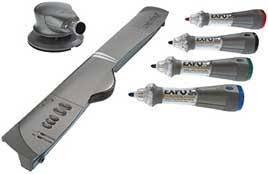
Training Resources for Mimio's:
Video Tutorials -
http://www.mimio.com/en-NA/Training/On-Demand-Video-Tutorials.aspxReference Guides -
http://www.mimio.com/en-NA/Support/Mimio-Product-Documentation.aspx
Mimio Connect:
http://www.mimioconnect.com/Community of Educators - find assistance, resources, lesson plans, lesson materials, connect with other educators and more.
Mimio blog - announcements, news and resources
http://blog.mimio.com/ Templates to use in class:
http://www.tusd1.org/resources/iw/templates.aspCurricular Links to use with Interactive Whiteboards:
http://www.tusd1.org/resources/iw/links.asp
--p-


