Showing posts with label adobe creative cloud. Show all posts

Thursday, June 5, 2014

Adobe Releases New Storytelling App for iPad


Adobe recently released a new Storytelling App for iPad. Adobe Voice, a new animated video app for
iPad, that gives anyone the ability to create and share engaging video stories. Adobe Voice allows you to create these video stories using a combination of your own recorded voice, imagery, music and cinema-quality motion graphics and effects. This is a great app for education, allowing students to create an interactive and engaging school project. Animated videos can be quickly shared via social media, email, personal blogs and websites, by posting a single link, and can be viewed on virtually any device.


Adobe Voice is available as a free download in the App Store. The app requires iPad 2 or higher and iOS 7. To learn more about Adobe Voice, visit http://getvoice.adobe.com/

Thursday, January 16, 2014

Adobe announces major updates to Creative Cloud, including 3D


Adobe Creative Cloud is Adobe's online suite of apps, including Photoshop, Illustrator, and InDesign. Today they announced some major updates, including the support for 3D printing, which is really cool, especially considering how popular 3D printing is becoming.


Read more below:

Major update to Creative Cloud with new features across its core tools—Adobe Photoshop CC, Adobe Illustrator CC  and Adobe InDesign® CC—including 3D printing support in Adobe Photoshop CC.
 Photoshop CC Advances Efficiency for DesignsDesigners can now radically improve collaboration with linked Smart Objects, which update the design automatically if a reference file is changed, and the new Perspective Warp feature, which changes the viewpoint from which an object is seen. New 3D printing capabilities integrated in Photoshop CC enable users to easily and reliably build, refine, preview, prepare and print 3D designs.
 Revolutionizing How Designers Work with TypeDesigners can now seamlessly connect to the Adobe Typekit font service in either Illustrator CC or InDesign, making it possible to integrate Typekit fonts into print projects, PDF files, DPS apps, and more. New functionality in InDesign CC reduces the frustration of missing font errors by automatically searching the Typekit desktop font library for options.
 Illustrator CC Gets Powerful New FunctionalityUsers can finesse designs more directly and intuitively with Live Corners, which allows designers to edit—and re-edit—the corners of shapes and paths visually with on-art controls, or input precise values. Additionally, Illustrator CC now offers more intuitive drawing with the rebuilt Pencil Tool; the ability to quickly modify existing objects and change the view of perspective drawings with Path Segment Reshape and export responsive SVG code and graphics.
 InDesign CC Meets New Creative ChallengesInDesign CC includes new support for EPUB 3.0 specification including new ways to add interactivity to eBooks, the ability to add pop-up footnotes that streamline the EPUB reading experience and support for Japanese Vertical Composition and Hebrew and Arabic text.
 Adobe Muse CC Gets More EngagingScroll effect enhancements in Adobe Muse CC make it easy to create subtle or dramatic scroll effects; a new Library panel stores frequently used design elements; and a dozen new social widgets make connecting to social media sites, like Facebook and Twitter, a snap. Also added, Adobe Muse Exchange, a community-based exchange where custom widgets and templates can be borrowed and shared.

Related:

Friday, June 21, 2013

Adobe Announces Updates to Creative Cloud


Adobe Creative Cloud was launched last year as a cloud offering of many of it's most popular applications. This month Adobe has announced a major update to it. The update adds new features, including cross device collaboration, syncing, and publishing. There is also an expanded community of users.

Adobe has also launched Create Now: a Celebration of Creativity, where Adobe will hots a variety of projects and programs and projects. You can read more about it here: http://adobe.ly/createnow

For more information about Adobe Creative Cloud and the updates, visit: https://creative.adobe.com/plans.

Friday, May 11, 2012

Adobe Creative Cloud launches today - CS6 apps, sync, storage system


On Monday, April 23rd, Adobe announced Adobe Creative Cloud Student and Teacher Edition, and Creative Suite 6 Student and Teacher Edition for institutions, educators and students worldwide.

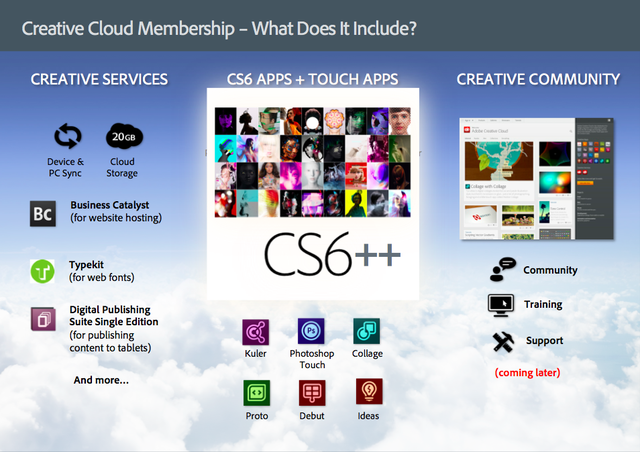
In addition to 14 new CS6 point products and four Creative Suites, Adobe is now delivering its first cloud offering for students and educators. Adobe Creative Cloud is a hub where students and educators can explore, share and deliver creative content using any of the Adobe Creative Suite 6 desktop applications, as well as new tools for HTML5 such as Adobe Muse™ and Adobe Edge Preview. By offering integration with Adobe Touch Apps, headlined by Photoshop® Touch, Adobe Creative Cloud enables new mobile workflows, from ideation to publishing, that bring the power of Adobe innovation to the classroom via iPad and Android tablets.


Top new features across the CS6 product line include:

New levels of performance with tools that take advantage of Adobe Mercury Graphics functionality, allowing users to go from ideas to finished work faster than ever before.
Enhanced user interfaces that vastly simplify workflows, so users can focus on their content and achieve results quicker.
New capabilities that streamline the creation of responsive content, ensuring website and apps look great across virtually all screen sizes and form factors.
Remarkable new science, integrated into imaging and video apps, makes previously impossible tasks suddenly possible.

Adobe Creative Cloud membership delivers:

Access to download and install all CS6 applications, new HTML5 desktop products – Adobe Muse™ 1.0 and Adobe Edge preview – and deep integration with Adobe Touch Apps.
Easy storage and sharing of content across desktop, mobile devices and the cloud.
Integrated website publishing and hosting.
Ongoing innovation that provides members with the most up-to-date products and services

Pricing and Availability

Adobe Creative Suite 6 products and Adobe Creative Cloud are available May 11. The Student and Teacher Edition of Adobe Creative Cloud is available for US$29.99/month. Volume licensing for Creative Cloud “team-ready” is available via the Adobe Transactional Licensing Program. More information on Adobe licensing can be found at: http://www.adobe.com/aboutadobe/volumelicensing/education/.

Adobe is also offering a new Adobe K-12 Enterprise Agreement designed for the needs of school districts in the United States and Canada. Customers can purchase Creative Suite 6 via Adobe.com and through select retail and online stores. More product information is available at: http://www.adobe.com/products/creativesuite.html.

For more detailed information about educational upgrade policies and pricing, as well as the full portfolio of suites, please visit http://www.adobe.com/education.edu.html.


Related / For More Information:

Adobe Announces Creative Cloud/Suite 6 for Students and Educators


Tuesday, May 8, 2012

Some awesome things happening at Adobe relating to Education


There is a lot going on at Adobe in regards to Education this week.


Creative Suite 6 and Creative Cloud - yesterday Adobe announced the immediate availability of the Adobe Creative Suite 6 Software and the Creative Cloud is expected to be available on Friday, May 11th. Students and Teachers can down the free, 30-day trial (or purchase) on Adobe.com, here: http://www.adobe.com/cfusion/tdrc/index.cfm?product=master_collection.
Here is a link to the release regarding product availability. http://www.adobe.com/aboutadobe/pressroom/pressreleases/201205/050712AdobeCS6Ship.html.


Teacher Appreciation Week & Day 2012

Teacher Appreciation Week - Adobe is running a contest on Adobe Students Facebook page. For the chance to win a $25 iTunes gift card, followers must tag @AdobeStudents and write a wall post about their favorite teacher/mentor and why. Write a story, post a quote, share a video/picture/give a shout out. For the chance to win $50 gift card, they can create something with Photoshop or Illustrator. Enter here: http://www.facebook.com/adobestudents.


More Info:

Adobe Announces Creative Cloud/Suite 6 for Students and Educators
Adobe Launches Creative Cloud - make, share, deliver creative work
Adobe CS6 Release Delivers Major Innovations For Design, Web and Video Pros


Wednesday, April 25, 2012

Adobe Photoshop Touch Review - very nice app


Adobe Touch Apps family

Adobe recently released a host of Adobe TouchApps - Photoshop Touch, Ideas, Collage, Debut, Kuler, Proto, and Carousel. Design, edit, and elegantly present your work using six new Adobe® Touch Apps designed for your tablet. Whether you use a stylus or just your fingertip, intuitive touchscreen features provide easy, precise control for a variety of creative tasks. Transfer files through Adobe Creative Cloud for refinement in Adobe Creative Suite® software — or to view, access, and share from almost anywhere.

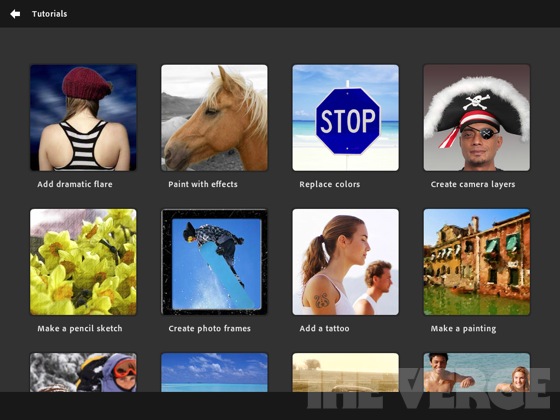
I have been using Adobe Photoshop Touch for the last couple of weeks on a loaned iPad and a friend has it on his Android tablet. The Photoshop Touch app lets you quickly combine images, apply professional effects, share the results with friends and family through social networking sites like Facebook, and more. If you have used Photoshop, the Touch app will be a breeze for you. If you haven't used Photoshop, don't worry, the Touch app is easy to use, has interactive tutorials, and there are tons of help resources on Adobe's site and for educators on the Adobe Education Exchange, which is a resource site for educators who use Adobe products. Tips, instruction guides, videos, a community of users, lesson examples and much more are all available to help teachers and students using Adobe products.


Adobe's new Creative Cloud/Suite 6 for Students and Educators integrates the Photoshop Touch app so that you can work on your projects seamlessly from mobile to desktop. 


The Photoshop Touch app was very easy to learn and get started with. I did use some of the tutorials, and had read a few posts on the education exchange site, but it was very intuitive. Features include layers, effects, filters, tone and edge editing, text, search for images, share images, wireless printing, and much more. The tools are all, literally at your fingertips on the app. Because it's not the full version of Photoshop, it's easier to find the tools that you use the most. It is probably the best image editing app for tablets around and still has all the really important and useful features from the full version of Photoshop. It's easy to bring in an image, edit and manipulate it, and the save it. It's only $9.99, which is super cheap for Photoshop and the Education Volume app store has it for $4.99, which makes it very affordable for education.

Adobe-photoshop-touch-ipad-review-7

I had some fun playing with different pictures I took with the iPad, although the quality of them wasn't great using the iPad's camera, so I also brought in some other pictures and graphics files to play with. It was very easy to clean up images and there is even a gallery of styles and effects that you can look at and then see a step-by-step tutorial on how to achieve those effects.

This is a great app for education. It's inexpensive, easy to use, full featured, and a tool that students should learn to use as it will help them in college and careers.

Here are some screenshots from Adobe's site:
pstouch-1-295x221
pstouch-2-295x221

pstouch-3-295x221

pstouch-5-295x221


Adobe Announces Creative Cloud/Suite 6 for Students and Educators
Link to Photoshop Touch page on Adobe's site: http://www.adobe.com/products/photoshop-touch.html

Original Announcement of app: Adobe PhotoShop Touch for iPad2 now available
Photoshop Touch for iOS. $9.99 


Photoshop Touch for Android. $9.99 


DISCLAIMER: I received a free copy of the Adobe Photoshop Touch app to do this review. I have been using it, and the Adobe Education Exchange, as part of this review.


LinkWithin

Related Posts Plugin for WordPress, Blogger...