Showing posts with label Vernier. Show all posts

Friday, April 24, 2020

Vernier Software & Technology Offers Free Remote Learning Resources for STEM


To keep students engaged in STEM learning during school closures, Vernier Software & Technology is offering a robust collection of free remote learning solutions for teachers and students. The resources, which support students at both the K–12 and college levels, cover a wide range of scientific disciplines including biology, chemistry, physics, and physical science.


Teachers can access a wide range of experiments, software, coding activities, courses, learning platforms, and more to engage K–12 and college-level students in STEM learning


“This is an unprecedented—and extremely difficult—time for teachers and students alike with extended school closures caused by COVID-19,” said John Wheeler, CEO of Vernier Software & Technology. “Our robust collection of free resources will help keep students engaged in STEM learning during this time, while supporting educators as they facilitate remote teaching. With these solutions, teachers can help students continue to form a deep understanding of key scientific concepts while outside the classroom and laboratory.”
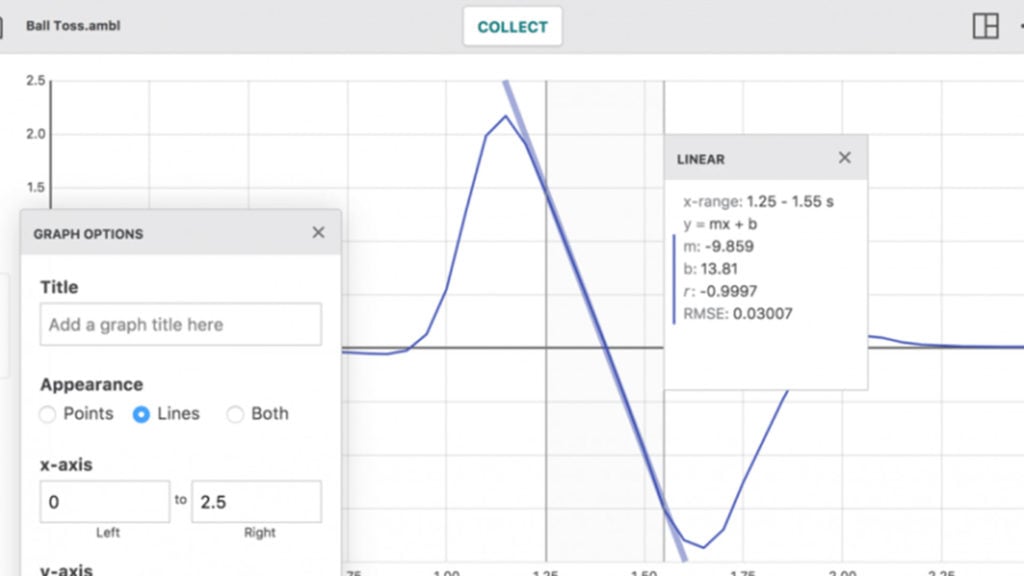


The free resources from Vernier include the following:

  • Experiment and Sample Data Library: Teachers can access more than 250 free experiments covering many subjects to distribute to students at home. Students can perform their own analysis of the sample data and answer questions based on their results.
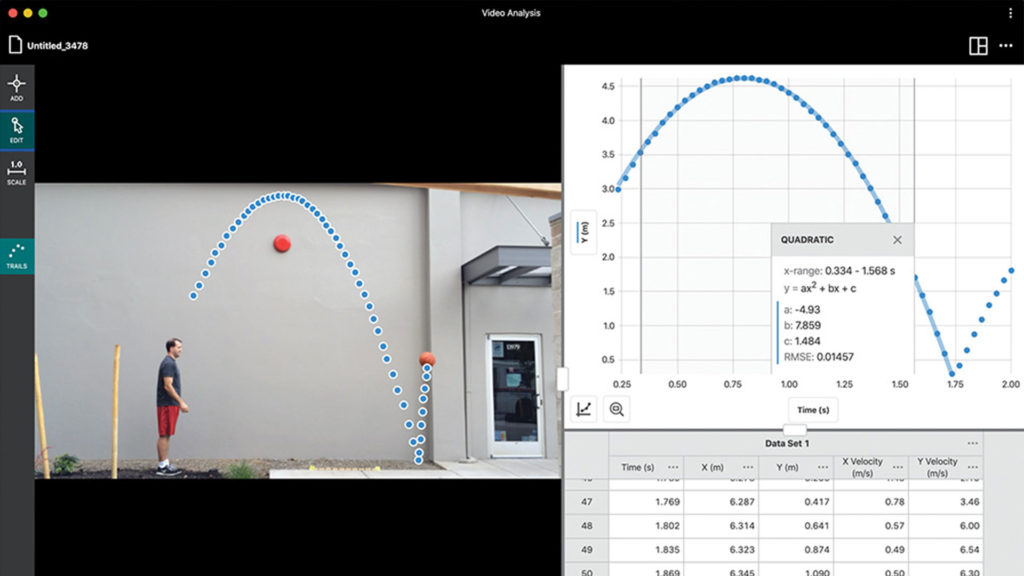
  • Vernier Video Analysis™: An extended free trial of this physics app is available through the end of June 2020. With the app, students can use their mobile devices to insert their own videos with recorded motion, mark points to track the object in motion, and set the scale of the video. This application is recommended for high school and college students.
  • Pivot Interactives: A 30-day trial and reduced subscription pricing, which runs through the end of June 2020, is available for this video-based science learning environment. With 200-plus interactive activities, the high-quality Pivot Interactives videos give students the opportunity to observe and study hard-to-replicate experiments and phenomena. Pivot Interactives is recommended for high school and college students.
  • Physics with Video Analysis Lab Book: Teachers can download this e-book for free through June 2020. It features experiments covering a wide selection of video analysis activities for introductory physics at the high school or college level. All experiments are designed exclusively for Logger Pro, a software program that teachers and students can also access via an extended free demo. This lab book is recommended for high school and college students.
  • Scratch Coding Activities: This collection of free Scratch-based coding activities with varying levels of difficulty can all be completed by students at home. Each activity includes step-by-step instructions for students and teachers. Scratch is designed for students ages 8 to 16.
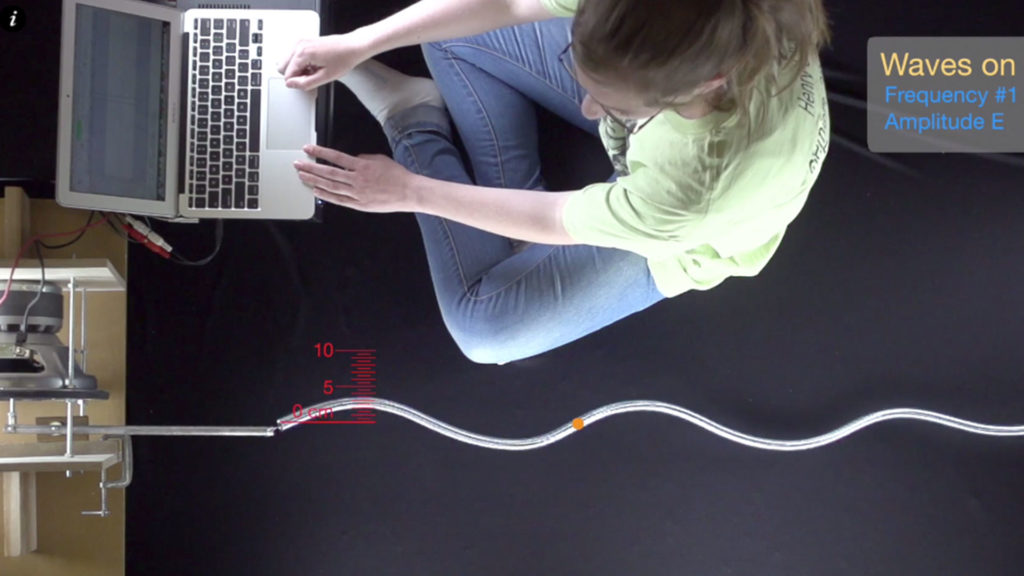
  • Additional free partner resources include the following:
  • Interactive Biology Course: ADInstruments and Vernier have partnered to create a free interactive biology course designed for college instructors to use in their remote learning instruction. A collection of experiments with sample data derived from three Vernier biology lab books helps educators teach scientific concepts, such as enzymes, while the intuitive Lt interface makes for a richer online experience for students and educators alike.
  • Lab Builder Platform: LabArchives has made its innovative learning platform free through the end of July 2020. Teachers can access Vernier experiments through Lab Builder, the robust content library by LabArchives, then customize online experiments easily using a digital laboratory notebook and course management tools. Teachers can also access Lab Builder to customize the experiments for different virtual lab setups, equipment, and learning objectives.

To learn more about these free remote learning resources from Vernier, visit https://www.vernier.com/remote-learning/.


RESOURCES:

More resources from Vernier

More STEM Resources


.

Monday, February 5, 2018

Vernier Software & Technology Launches Go Direct Sensor Cart


Vernier Software & Technology Launches Go Direct Sensor Cart


Vernier Software & Technology recently launched the new Go Direct® Sensor Cart for middle school, high school, and college physics students. The wireless dynamics cart allows students to easily explore force, position, velocity, and acceleration using Bluetooth® wireless technology.

This is a great way for students to explore and gain an understanding of kinematics and dynamics.

Product image for Go Direct® Sensor Cart


www.vernier.com/gdx-cart


Related:


.

Monday, March 23, 2015

Using Vernier Data Tools on a Chromebook


Determining grip strength with the Hand Dynamometer, Go!Link, and Graphical Analysis for Chrome

Chromebooks are very powerful, and very useful, devices. You can even use them with Vernier Data Tools.


Vernier is a huge name in data collection tools for science and math and they have been working to support Chromebooks for some time.  Earlier this year they released their Graphical Analysis tool for Chromebooks (free) and they have continued to make their products work with Chromebooks.


There are two different ways you can use their tools with Chromebooks. One is using a USB connector and the other is wireless. For the USB connection for the sensors, you need the USB connector and the Graphical Analysis Software. For the Wireless connection, you need the Labquest device and the software. Many schools already have the Labquest devices anyway.

USB
  1. Students begin their experiment by connecting sensors to their Chromebook USB port.
  2. Using Graphical Analysis for Chrome, students set experiment parameters and start data collection.
  3. Real-time sensor data is shown as a graph, a meter, or a table for different learning styles.
  4. Students can annotate their graph, perform curve fits, run calculations, and more.
  5. Students can easily create and send a finished lab report to their instructor, save their work to Google Drive™, or export data to Plotly™ for further study.
Wireless
  1. Students in a lab group set up an experiment with Vernier sensors and LabQuest 2.
  2. Each student launches Graphical Analysis for Chrome on a Chromebook and connect to LabQuest 2.
  3. After starting data collection, experiment data are wirelessly streamed from LabQuest 2 to each Chromebook.
  4. Every lab group member analyzes data on a Chromebook in class or at home.


Vernier devices and sensors are used by high school and college courses around the world and it's nice to see that Chromebooks are supported.


Related:

What can you do on a Chromebook? Pretty much everything.


Tuesday, January 20, 2015

Vernier releases free Graphical Analysis app for Chromebooks


Vernier, makers of very popular sensors and data collection systems, have just released their free Graphical Analysis app for Chromebooks. This addresses a huge need for schools using Chromebooks, and one obstacle that kept some schools from adopting Chromebooks.

This app was specifically designed for Chromebooks and allows you to collect and share scientific data using Chromebooks. Students connect to LabQuest2 interface equipment wirelessly to collect data from Vernier sensors. The app can then be used to create graphs, create annotations, and perform analysis with statistics. Graphs and data can then be exported into Google Drive. More updates, including the ability to connect sensors directly to a Chromebook's USB port, are coming.

By spring of 2015, updates to the app will provide teachers and students with the ability to connect a Vernier Go!Temp®, Go! Motion® or Go! Link® to Chromebook’s USB port for data collection. Using Go! Link, a single-channel interface, students can collect data using Vernier sensors. Teachers can also link multiple Chromebooks with a single LabQuest® 2 and use the data-collection device to wirelessly collect and stream data to each student’s Chromebook in a lab group.


This is great news for schools and classrooms that use Chromebooks and Vernier, or use Vernier and want to get Chromebooks. 

Press release is below. 


FOR IMMEDIATE RELEASE:
Contact:          Daylene Long                                                  Christine LynchVernier Software & Technology                     KEH Communications503-277-2299                                                  410-975-9638dlong@vernier.com                                        christine@kehcomm.com
Vernier Expands Its Data-Logging Capabilities for Chromebooks
New Graphical Analysis™ for Chrome™ app allows science teachers and students to use Chromebooks for direct USB data capture with sensors

BEAVERTON, Oregon, January 20, 2015 – To address the extensive adoption and use of Chromebooks in classrooms, Vernier Software & Technology recently released its free Graphical Analysis™ app. Developed specifically for the Chrome™ operating system, the new app makes it easy to collect and share scientific data using Chromebooks. By spring of 2015, updates to the app will provide teachers and students with the ability to connect a Vernier Go!Temp®, Go! Motion® or Go! Link® to Chromebook’s USB port for data collection. Using Go! Link, a single-channel interface, students can collect data using Vernier sensors. Teachers can also link multiple Chromebooks with a single LabQuest® 2 and use the data-collection device to wirelessly collect and stream data to each student’s Chromebook in a lab group.

“With more than a million purchased by schools last year, Chromebooks are becoming the mobile device of choice in many classrooms,” said David Vernier, co-founder of Vernier and former physics teacher. “Graphical Analysis for Chrome and its support of Vernier sensors provides schools with an easy-to-use and cost-effective way to further utilize Chromebooks and engage students in hands-on learning in science and STEM classrooms.”

Graphical Analysis for Chrome enables teachers and students to use an extensive variety of Vernier sensors with Chromebooks to engage students in hands-on learning as they perform investigations and explorations of science concepts. The app allows students to use the data in tables, to calculate statistics and to perform curve fits. Students can additionally create and send experiment results to teachers, save work to Google Drive™ or export data to Plotly™ for further study.

Graphical Analysis is available for free. To learn more about Graphical Analysis for Chrome, visit www.vernier.com/ga-chrome.

About Vernier Software & TechnologyVernier Software & Technology has been a leading innovator of scientific data-collection technology for 34 years. Focused on science, technology, engineering and mathematics (STEM), Vernier is dedicated to developing creative ways to teach and learn using hands-on science. Vernier creates easy-to-use and affordable data loggers, sensors, and graphing/analysis software. With world-wide distribution to over 130 countries, Vernier products are used by educators and students from elementary school to college. Vernier’s technology-based solutions enhance STEM education, increase learning, build students' critical thinking skills and support the science and engineering practices detailed in the Next Generation Science Standards (NGSS). Vernier’s business culture is grounded in Earth-friendly policies and practices, and the company provides a family-friendly workplace. For more information, visit http://www.vernier.com.

# # #

 --

Friday, March 2, 2012

Vernier announces LabQuest2 - Android, iPhone, iPad data collection and analysis


Vernier, the company that makes those really cool data collection probes and sensors and analyzing software, has just announced LabQuest 2 software. As part of their new Connected Science System, LabQuest 2 provides tools for mobile devices such as Android, iPhone and iPad, to collect, analyze, save and share sensor data. The system also allows remote viewing and controlling of LabQuest with a computer and the ability to email data and graphs for later analysis.

This is another example of leveraging the mobile devices that are already in students' hands for educational uses.


LabQuest 2 with iPads iPhones and tablets
They also have two new devices: a Polarimeter (Chemical) and Projectile Launcher.

Vernier products are in use in science classrooms (and some math) to collect, analyze and interpret data from experiments and activities. Their products are similar to what is used in industry, so students learn content and theory and how to use digital tools. 

Teaching Science with Technology - Looking for a dynamic way to teach science? Vernier puts easy-to-use data loggers, sensors, experiments and graphing/analysis software into the hands of students, helping educators develop the next generation of scientists and engineers.

They allow students to spend more time learning the concepts and theory and also allow for better visualization and analysis of data.


Vernier also has resources to help find grants and funding for these products and I've gotten many through DonorsChoose.

Vernier also runs free workshops around the country where they show you how to use their products. You can also get package deals that include manuals and products.


Related:

Vernier Data Collection Sensors and Tools

10 Things Students use technology for in my class (including Vernier)

TI announces the TI-Nspire CX, it's first color-display, handheld graphing calculator - works with Vernier.


Friday, May 15, 2009

Sources of Funding for Teachers


Teachers have always had to scrounge for funding and the current economic situation only makes this more of an issue. Even with the government stimulus package, teachers will not see much money for our individual use. We've all wished we had more money to purchase books, supplies, equipment, and other items for our students and our classrooms. But what do we do when the money just isn't there?

The first place to look is grants. There are a lot of grant sources out there. Not all of them are easy to get though. I always suggest that people ask for help from grant writers or other teachers who have been successful in getting grants. Most grants have tips and advice on their own web site also.

Some schools may qualify for Priority School District grants and other State and Federal grants. These are for low income districts and can be used for supplies and equipment to help with extra programs related to drop out prevention and improving student performance.

A great resource for funding classroom projects is Donors Choose. Donors Choose was actually started by teachers. You sign up for an account, fill out a project proposal, selecting the items you need from a variety of vendors, and then people with money to donate go to Donors Choose and select projects to fund. I have had multiple projects funded through Donors Choose. It is a very simple process and the staff can help you with any problems.

Corporate grants are another source of funding. ToyotaToshibaVerizon,MicrosoftBest Buy, and Target all have grant programs you can apply for.

Some vendors have their own grant programs, special pricing or can help you find grants to buy their products. Smart Technologies, Epson, Mimio andVernier are some of the companies that will work with you to hep you find funding.

Donations are another source. Local Businesses may be looking to donate money, supplies or equipment. Many companies would rather donate old equipment and supplies to a school rather than just throw it out. Your school gets supplies and the company gets a tax write off. I have gotten lab supplies from a DNA company that updated their labs, a computer from a small company that upgraded theirs, and our school has gotten office supplies and furniture from a nearby business that was moving their headquarters. Many teachers have contacts at area businesses through friends or family. Use these contacts to your advantage.

Do more with less. Look for cheaper or free alternatives to the major brands. There are a lot of manufacturers of interactive white boards out there. Shop around and find the best deal. Use free software and web services instead of paying for licensed software.

Partner with local colleges. Sometimes they have older equipment that they can donate to you. They may also have grants that they can get that can also benefit the K-12 system.

Look for grants and funding opportunities on the web. Tech&Learning has a great section on funding tips. There is a Grant Guru column, as well as a data base of grant sources.

Edutopia and Nortel Learn It also have grant and funding resources. And of course, you can always "Google" for more information. Educational conferences are another great way to find funding resources and talk with vendors on different ways of funding purchases.

Please share your funding and money tips with us!

LinkWithin

Related Posts Plugin for WordPress, Blogger...