Free resources for teachers, educational ideas and tips, educational topics, Personal Learning Networks, Project Based Learning, Google, Evernote, Discovery Education and more.
Pages
- Home
- Google for Education Resources
- STEM Resources
- Evernote for Education
- My Favorite Resources for Teachers and Students
- Create a Personal Learning Network
- Android for Education
- Discovery Education Resources
- Project Based Learning
- Advertise on this site
- About the author and blog
- Speaking and Consulting Services
Showing posts with label digital literacy. Show all posts
Tuesday, May 8, 2018
Free Webinar - Alan November on Teaching Critical Thinking and Web Literacy
International education advocate Alan November will be holding a webinar
titled “Teaching Critical Thinking and Web Literacy: Why Teachers are
More Important Than Ever” on May 22. Alan has been saying for years that
for years that these are areas that need attention, so I'm inviting
everyone to attend!
Webinar attendees will learn about the role critical thinking plays in
web literacy and methods for teaching students to become astute
consumers of media. Various aspects of media literacy will be discussed
along with strategies for developing skills and competencies in those
areas. Alan will also share strategies and resources for weaving
critical thinking and web literacy skills into everyday instruction and
guiding students toward becoming responsible consumers and creators of
web and social media content.
Alan November is an international leader in education technology and was named one of the USA's fifteen most influential thinkers of the decade by Tech and Learning magazine. Alan's most recent book, Who Owns the Learning? made the education New York Times bestseller list. Alan has worked with schools and universities in 40 countries to improve learning through innovative practice. He leads the globally acclaimed Building Learning Communities conference.
If you're interested, you can register for the webinar at
https://bit.ly/2HNccix
Related:
Important Skills Students Need for the Future
New Training Courses from Google - DigCit and Accessibility
Resources on 21st Century Skills
Digital Literacy Resources
-
Wednesday, May 11, 2016
Great resources on Digital Equity from CoSN (free)
As schools go more and more digital with systems, curriculum, assignments and more, they face the need to provide equity in digital access for their students. Student devices are part of it, but so is internet access at home.
This year has seen a huge increase in attention to "Digital Equity" or the "Digital Divide". Here are some great free resources from CoSN ( Consortium for School Networking ) that can help you understand the issue, and address it.
Digital Equity Action Toolkit
Students without home access to high quality broadband connectivity are at a disadvantage, unable to realize the full power of digital learning. Only 3 percent of teachers in high-poverty schools said that their students had the digital tools necessary to complete homework assignments, compared to 52 percent of teachers in more affluent schools, a discrepancy sometimes labeled the "homework gap."
To address this key challenge, CoSN launched the Digital Equity Action Agenda initiative. This effort highlights how some school districts are building meaningful community partnerships and creating tools to help district leaders get started in achieving digital equity.
Our new toolkit provides educational leaders with the information they need to address digital equity in out-of-school learning. As a member said:
"The CoSN Digital Equity Action Toolkit is the best and most practical document I have seen on this topic." --Devin Vodicka, Superintendent, Vista USD, California
Download the ToolKit here: http://www.cosn.org/digital-equity-action-toolkit-february-2016
Digital Equity Infographic (click to go to original PDF)
More resources
Digital Divide Resources
Digital Literacy Resources
Digital Equity Resources
-
Monday, July 20, 2015
Mozilla Foundation announces some new, free educational resources
This summer, Mozilla is rolling out new, free tools and curriculum to help learners of all ages achieve web literacy.

Webmaker Beta is a free, open source Android app that allows smartphone users of any skill level to create original content online. Here is a blog post on Webmaker and you can download it here.
Maker Party is Mozilla's annual global campaign to teach web literacy through hands-on learning. This year, from July 15 - 31, educators and students can use their curriculum and teach others how to read, write and participate online. Activities touch on privacy, HTML, collaboration and more. You can read more about it here.
It's very much a networked initiative: individuals and organizations (schools, libraries, etc.) can host and customize local Maker Parties. Visit the 2015 website for more information.
These are some great resources for schools to use to help teach web/digital literacy.
10 Tech Skills Every Student Should Have
How to Evaluate Web Resources
Internet Safety Resources:
Internet Safety Resources - help students stay safe online
Discovery Education Web 20.14 - great internet safety resources.
Google Good to Know - online safety and data info
Google Family Safety Center - help promote safety online.
-
Monday, April 27, 2015
Internet Safety and Information - what data do the big companies collect?
Technology is a wonderful thing. It lets us connect, explore, learn and create. However, there are some drawbacks and everyone is concerned about their data and what the big tech companies collect about them.
I'm a huge user and proponent of Google Apps, but I'm also careful with what I put online anywhere.
This infographic shows some of the data and information that Google, Facebook and Apple have and collect about their users. It is a good resource to use when teaching digital literacy and internet safety.

The Loss of Privacy from Google Apple and Facebook
Compliments of BackgroundChecks.org
More resources:
10 Tech Skills Every Student Should Have
How to Evaluate Web Resources
Internet Safety Resources:
Internet Safety Resources - help students stay safe online
Discovery Education Web 20.11 - great internet safety resources.
Google Good to Know - online safety and data info
Google Family Safety Center - help promote safety online.
Web safety resource
Google Plus now open to Teens, with safety features
PBS Teachers - Excellent Resources for Educators - has resources on internet safety
Top 10 Resources from Discovery Education - all free - internet safety lessons too
-
Monday, March 2, 2015
Teaching Digital Citizenship - free online course for teacers to help teach students to be safe online
Teaching Digital Citizenship is a free, new tool that educators can use to keep kids safer online.
Teaching Digital Citizenship is a self-paced, online training program to help educators, law-enforcement officers, and others teach Internet safety and prepare children ages 5-17 to be better digital citizens. This training can help anyone involved with educating children understand the risks kids face online and how to empower them to be responsible digital citizens. The course is self-paced, consists of a series of videos and quizzes that take about an hour to complete. Upon completion, participants will receive a certificate that can be used to apply for continuing education credits.

The topics covered include:
· Introduction to digital citizenship
· Digital literacy and ethics
· Inappropriate content
· Online sexual solicitation
· Online privacy
· Sexting
· Cyberbullying
There is also an Educator Resource page that has presentations, lesson plans and more to help teach students online safety. The resources are sorted by type and by standards and grade level.
These days, it is even more important to help our students stay safe online.
More resources:
Internet Safety Resources - help students stay safe online
Discovery Education Web 20.11 - great internet safety resources.
Google Good to Know - online safety and data info
Google Family Safety Center - help promote safety online.
Web safety resource
Google Plus now open to Teens, with safety features
PBS Teachers - Excellent Resources for Educators - has resources on internet safety
10 Tech Skills Every Student Should Have
Top 10 Resources from Discovery Education - all free - internet safety lessons too
--
Friday, September 28, 2012
Edmodo and Common Sense Media release free Digital Citizenship resource for Educators
Digital Citizenship is an important topic and something that we must teach our students (and ourselves) in today's digital world.
Edmodo, a great educational app, and Common Sense Media have created a Digital Citizenship Starter Kit that teachers can download to use with their students. It is an page PDF file that is free.
The Digital Citizenship Start Kit includes a poster and lessons and activities that cover topics such as privacy, internet safety and security, plagiarism, and cyberbullying. You can also join the Digital Citizenship Community on Edmodo.
In addition to the starter Starter Kit, Common Sense Media and Edmodo are participating in Digital Citizenship Day in New York on October 2nd. Check out the Edmodo group (for teachers and students) for more details on the day and the Town Hall for teens, hosted by MTV executive news producer and hip-hop artist, Sway Calloway.
Related:
Edmodo - awesome free social learning network - has free Digital Citizenship poster for download
Edmodo, a great educational app, and Common Sense Media have created a Digital Citizenship Starter Kit that teachers can download to use with their students. It is an page PDF file that is free.
The Digital Citizenship Start Kit includes a poster and lessons and activities that cover topics such as privacy, internet safety and security, plagiarism, and cyberbullying. You can also join the Digital Citizenship Community on Edmodo.
In addition to the starter Starter Kit, Common Sense Media and Edmodo are participating in Digital Citizenship Day in New York on October 2nd. Check out the Edmodo group (for teachers and students) for more details on the day and the Town Hall for teens, hosted by MTV executive news producer and hip-hop artist, Sway Calloway.
Related:
Edmodo - awesome free social learning network - has free Digital Citizenship poster for download
10 Important Skills Students need for the Future
Google Launches YouTube curriculum on Digital Citizenship
10 Technology Skills Every Educator Should Have
Google Launches YouTube curriculum on Digital Citizenship
10 Technology Skills Every Educator Should Have
Wednesday, August 1, 2012
Google Launches YouTube curriculum on Digital Citizenship
Google has a new curriculum on YouTube that helps teachers educate students on digital citizenship, including online safety, etiquette and more. It is for students aged 13-17 and there are 10 lessons about YouTube’s policies, how to report content, how to protect their own privacy, and how to be responsible YouTube community members and digital citizens.
There are guidelines for teachers, slides for presentations and a YouTube Curriculum channel with the videos.
Related:
10 Tech Skills Every Student Should Have
10 Important Skills Students need for the Future
Edmodo - awesome free social learning network - has free Digital Citizenship poster for download
Tuesday, May 1, 2012
Edmodo - awesome free social learning network - has free Digital Citizenship poster for download

Edmodo, the awesome, free social learning network, has a great, free poster on Digital Citizenship you can download. The download is available in either 8x11 or 11x17 versions, both PDF files.
Digital Citizenship - responsible and safe use of digital tools and resources - is a very important skill to teach our students. These posters can help remind your students of these points.
Check them out: http://blog.edmodo.com/2012/04/30/free-download-digital-citizenship-poster/
Related:
Edmodo - free social learning platform expands and improves
10 Tech Skills Every Student Should Have
10 Important Skills Students need for the Future
22 Great Tips on using Edmodo in the classroom
5 Great course management resources for educators
Which Social Network should you use? Infographic on which to use when.
Some more great Android Apps for Education (including Edmodo app)
10 Important Skills Students need for the Future
22 Great Tips on using Edmodo in the classroom
5 Great course management resources for educators
Which Social Network should you use? Infographic on which to use when.
Some more great Android Apps for Education (including Edmodo app)
Wednesday, February 29, 2012
Great collection of E-Safety/Digital Literacy Resources
Internet and online safety (e-safety) and digital literacy are huge issues that students need to understand and learn about. A member of my PLN shared this site with me yesterday.
"E-Safety Resources – supporting teaching Digital Literacy" is a site in the UK that has a huge collection of resources to help educators teach, and students to learn, about internet safety and digital literacy.
There links to simulations for social media issues, videos from Common Craft, games, lesson resources and many other sites and resources for digital literacy and safety.
Every teacher should discuss digital literacy and online safety with their students and this site has the resources to help them do that.
More resources:
Internet Safety Resources - help students stay safe online
Discovery Education Web 20.11 - great internet safety resources.
Google Good to Know - online safety and data info
Google Family Safety Center - help promote safety online.
Web safety resource
Google Plus now open to Teens, with safety features
PBS Teachers - Excellent Resources for Educators - has resources on internet safety
10 Tech Skills Every Student Should Have
Top 10 Resources from Discovery Education - all free - internet safety lessons too
Friday, February 10, 2012
Kitzu - Find, Learn, Create digital learning resources

Kitzu is a great resource for finding "Digital Kits" for education. These digital kits are zip files packed with resources on the topic. The kits have PDF files with information, summaries, and resources. The kits also have picture files, musics, video (depending on kit) that can be used. The materials are all copyright-safe.
The resources are sorted by grade, K-12, and subject, English/Language Arts, Math, History/Social Science, Dance, Music, Science, Theatre, and Visual Arts.
You find a kit for the grade level and subject area, research the topic, and then create a video or media project using the resources.
This is a great resource for teachers to find lesson ideas and resources, or for students to use to research different topics.
It was developed by the Orange County Department of Education (CA) and anyone can create and submit kits.
Wednesday, February 1, 2012
Digital Learning Tips for Students - from Edutopia

Today is Digital Learning Day which is part of a campaign to improve teaching and learning through the use of digital tools and technology.
Edutopia has a great article today entitled "Seven Digital Learning Tips for Students" that list and explain seven attributes that students should have or need to develop for successful online learning.
Considering how much learning, whether formal or informal, is done on line, these are important tips and attributes.
This list complements my list of "10 Tech Skills Every Student Should Have" and "10 Important Skills Students Need for the Future."
Edutopia is a great resource for educators, especially in regards to best practices, project based learning, digital learning, classroom management, assessment, and technology integration.
Monday, January 23, 2012
Digital Learning Day Feb 1, 2012 - free resources for educators
Digital Learning Day is February 1, 2012 and is a year long national awareness campaign to improve teaching and learning through the use of digital tools and technology.
The site asks for people to participate and sign up, but also has some great resources for educators, administration, and more. Resources are in toolkits and include Project Based Learning, lesson plans and ideas, collaboration tools, and much more.
You can sign up and participate, or just use the resources with your classes.
Tuesday, January 10, 2012
Google Digital Literacy Tour - curriculum on online responsibility and safety

Google, one of my favorite resources as an educator, has another great resource for students and teachers.
The Google Digital Literacy Tour is a curriculum developed by Google and iKeepSafe that educators can use in the classroom to teach online responsibility to students.
It is a fun, interactive curriculum with hands-on activities and scenarios and is broken into 3 parts. Each part as PDF downloads for educators and students, along with lessons and videos. There is a guidebook for the teacher, along with videos and presentations.
The three parts are: Detecting Lies and Staying True, Playing and Staying Safe Online, and Steering Clear of Cyber Tricks.
This is a great resource to use with students as you teach them cyber-skills and computer use. It is also a great resource to share with adults who may not know enough about cyber-safety and use.\
Related:
Google Resources for Educators
10 Important Skills Students Need for the Future
Wednesday, December 21, 2011
Google Good to Know - online safety and data info
Google Good to Know is another great resource from Google. Good to Know has information and tips for internet safety, how your data is collected and used online, how Google uses data, and how to manage your data and what you share with web sites and Google.
This is a great resource for everyone and educators can use this to help students be more safe online and more knowledgeable about online data.
Tuesday, December 13, 2011
Zooburst - create interactive 3D pop-up books
Zooburst is a fun tool that lets the user create a digital story in a 3D pop up book. There is a free account available, but if you are going to use this with your students a lot, the paid versions offer a huge amount of class management features.
The books are online and all you need is a web browser with Flash. You can use items from their database or upload your own. The books are truly 3D and you can rotate everything around using your mouse. Items can also be clickable, opening up more information about the item. You can share your book via a link or embed them in a web page. You can even use your webcam to create an augmented reality book.
There is a gallery of books that you can view for ideas. There is also a very good support page.
This is good for any grade level and teachers can even use it to create help resources for their students. Use it for presentations as an alternative to PowerPoint. Use it for creative writing.
Get your students doing some digital story telling in a fun way.
Check out the gallery for some examples.
Monday, November 30, 2009
Digital Literacy Resource

Digital Literacy is an animated, interactive web site that teaches students about digital literacy, safe use of the internet and more. The site is hosted by the Northwest Learning Grid.
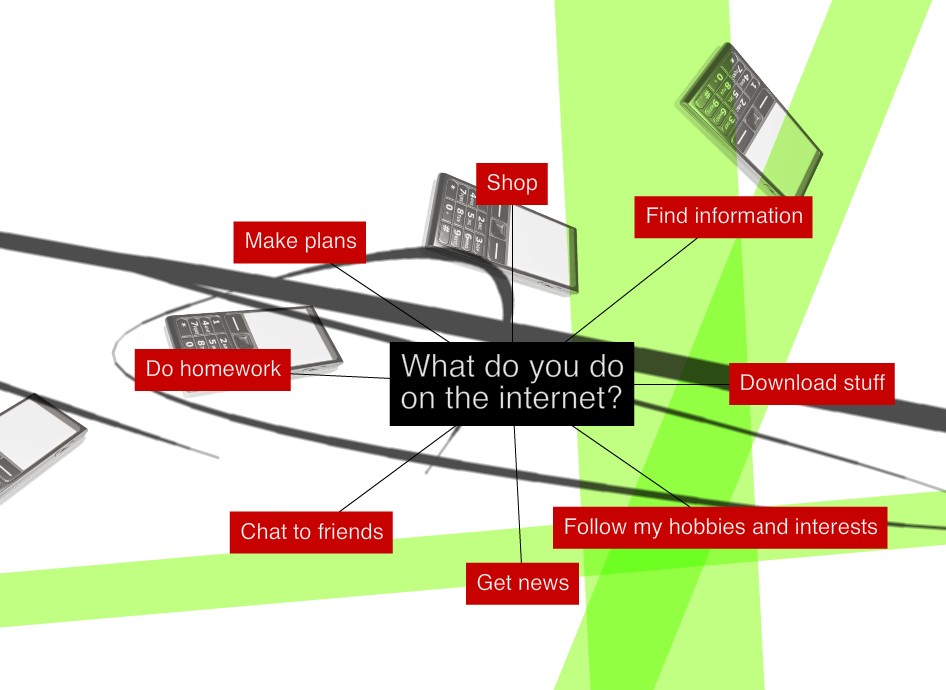
The site is beautifully designed with swirling graphics and minimal menus. It starts by asking the student to select one thing that they do on the internet. It then brings the student to a quiz about using the internet for that task.
The quiz asks some really good questions about the internet and it's usage for the task it selected. The site then "grades" the quiz with some feedback and brings the student to a menu of tutorials about internet use. Some of the tutorials go over analyzing web sites and blogs for relevancy, accuracy, and objectiveness.
I found the site to be fun and easy to use with some great information for students.
Subscribe to:
Posts (Atom)