Showing posts with label file conversion. Show all posts

Monday, April 27, 2015

SmallPDF - free, online PDF Tools - compress, convert, split and more

PDFs are one of the most popular document formats, mainly because you can view them easily on any device. Sometimes you need to modify them or convert them to other formats depending on your usage.

SmallPDF is a free, online service that gives you the ability to compress, convert, split, merge, modify, (and more) PDF files.

It's very easy to use. Select the function you want to perform from the home page and then just drag and drop your files. It's that easy. It supports converting images to PDF and PDF to Office and Office to PDF, along with much more.

You can even send them a PDF and they will print it and mail it to an address for you.

Here is a list of all of the functions.

Compress PDF
JPG to PDF
PDF to JPG
PDF to Word
PDF to Excel
PDF to PPT
Word to PDF
Excel to PDF
PPT to PDF
Merge PDF
Split PDF
Unlock PDF
Send letter


Here are some More Resources for working with PDF Files  (lots here, plus more listed below)

PDF Converter - free online PDF conversion

Lots of PDF resources - print, markup, convert and more

PDFBinder - simple tool to merge PDF documents into one

BabyPDF - Edit PDF documents for free

Crocodoc - markup PDF files for free

Fill Any PDF form - fill out, sign and send forms


-

Wednesday, March 11, 2015

Cometdocs - free file conversion - online and Chrome Extension

Cometdocs logo


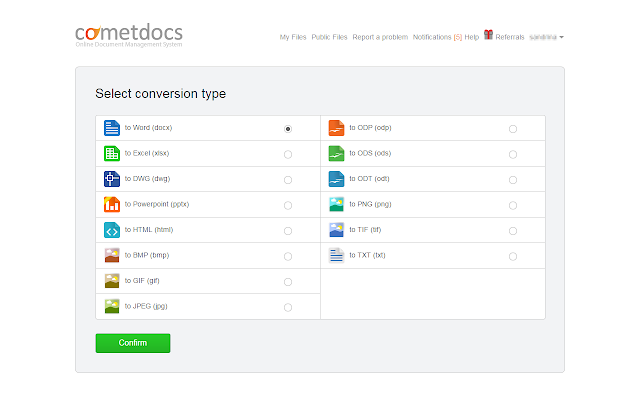
Cometdocs is a free online file converter. It converts PDF files to Word, Excel, PowerPoint, AutoCAD, HTML, and other formats. You can also create PDF files from almost any file format, including XPS, Publisher and more. You can also store your documents online and share them. You get 2GB of storage with the free account. 


There is also a Chome extension, Cometdocs PDF converter:  https://chrome.google.com/webstore/detail/cometdocs-pdf-converter/olgfoomjdkeijllelookodfgiogbdoch/

These are some of its main highlights of the Chrome Extension:
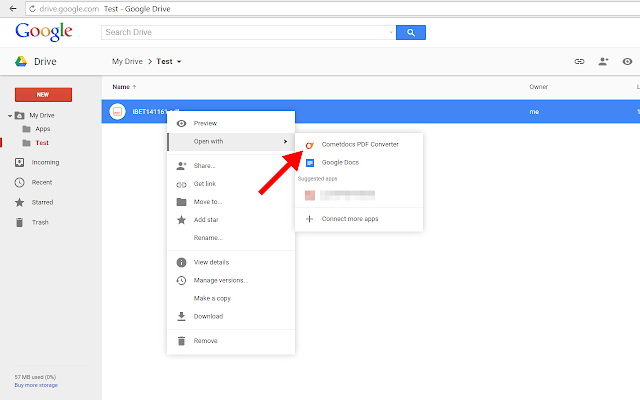
  • Converts files right inside Google Drive, no need to leave the service.
  • Converts PDF to Word, Excel, PowerPoint, Text, Images, OpenOffice (not just PDF to Word like Google Drive) formats.
  • Unlike Google Drive itself, files larger than 2 mb can be converted. No limit on page numbers.
  • There is a limit for free users of five free conversions per week, but this is higher than most similar services. 
  • Images and documents in Microsoft Office Formats (not Google Docs formats) can be converted to PDF as well, without leaving the service.

Users can use the Chrome app with the free account as well. The only difference between the free and the premium account is in the number of conversions per week (free users have 5 available conversions per week), which is more than other similar services offer.

The conversion quality remains the same, but the conversion of scanned documents is reserved for Premium users only. You can find more details on account types here - http://www.cometdocs.com/user/subscriptions


Related:


More Resources for working with PDF Files


--

Monday, March 2, 2015

Free Online PDF to Word Converter


PDFs are one of the most popular document formats, mainly because you can view them easily on any device. However, sometimes you need to convert one to a Word document to edit it. There are a lot of different PDF tools out there. Here is another.

Scanned PDF to Word is a free online tool for converting PDF documents to Word (.docx).

- There are no restrictions. Files of all sizes can be sent for conversion an unlimited number of times.
- Absolutely all pages in the document are converted.
- Both scanned and standard PDF files are supported.
- Even complex PDF files with forms, tables, images, non-standard layouts etc. are converted accurately.
- Everything is free – the only price is viewing a couple of ads and nothing more.
It's very easy to use. Select your PDF file to convert, enter your email address, and click "start". When it's done you'll get an email.


Here are some More Resources for working with PDF Files  (lots here, plus more listed below)

PDF Converter - free online PDF conversion

Lots of PDF resources - print, markup, convert and more

PDFBinder - simple tool to merge PDF documents into one

BabyPDF - Edit PDF documents for free

Crocodoc - markup PDF files for free

Fill Any PDF form - fill out, sign and send forms

I Love PDF - merge or split PDF files


--

Monday, May 20, 2013

CloudConvert - online file format conversion


CloudConvert is a free, online file format conversion service that lets you easily convert files from different formats. Simply select, or drag and drop, your files, select options (email when done, send to Dropbox, send to Google Drive) and off you go. As it's name implies, everything is done in the cloud with no software to download. It also works in mobile browsers so you can convert files on the go to be able to view them on your mobile device.

The send to Dropbox and Google Drive are options that most conversion services don't have. Most of them send  you an email with a link that you click on to download your converted file. This makes things more streamlined.

It supports over 100 audio, video, document, archive, image, ebook, spreadsheet and presentation formats with advanced options for each.


Guest users (no login) get 5 daily conversions, with up to 2 concurrent and a 100MB file size. Registered users (can user Google+, Facebook, Twitter, or create account) get 25 daily conversions and up to 5 concurrent conversions with a 1000 MB file size.


Related:

VLC - Awesome free video and audio player (and converter)

Lots of PDF resources - print, markup, convert and more

Media Converter - fast free online audio and video converter

Free Video Format Conversion Software (3 of them)

Zamzar - free online file conversion - great resource

Online Converter - convert file formats of audio, video, docs, eBooks, images and more


Monday, May 14, 2012

PDF Converter - free online PDF conversion


PDF files are everywhere. Every operating system and every device I know of can read them. They are a great way to share and publish files since they can be locked, watermarked, and viewed on pretty much any device or OS. Most office suites allow you to save files as PDF formats and there are some other great tools for creating them.

PDF Converter is a free site that allows you to convert PDF files to DOC, XLS, or PPT file formats and will also let you create PDF files from almost any file format.


It's very easy to use and there is nothing to download or install on your computer. Simply select the conversion you want to do, upload your file, enter your email address and when the service has finished your conversion, you will get an email with the link to the converted files. There is a file upload limit of 2MB, but there is no limit on how many conversions you can do.

Try it out: http://www.pdfconverter.com/free-pdf-conversion-online/


Related:

PDF - interesting infographic and lots of resources for using them


Friday, March 9, 2012

Online Converter - convert file formats of audio, video, docs, eBooks, images and more


Online Converter is a great resource for anyone. The free site can convert file formats for audio, video, documents, archives, images, ebooks, and more. The site can convert almost any format to another. This is a great resource when dealing with multiple computer systems and software (Apple vs. PC, Word vs. Writer, etc.).

It is easy to use and works great.


Related:

VLC - Awesome free video and audio player (and converter)

Lots of PDF resources - print, markup, convert and more

Media Converter - fast free online audio and video converter

Thursday, February 16, 2012

Media Converter - fast free online audio and video converter


Media Converter is a free site that allows you to convert audio and video files to different file formats.

To convert a file, you either enter a link, upload the file, or browse YouTube directly. The free version will let you convert files up to 100MB in size. It's easy to use and is very useful if you find videos that you can't play without converting, need to convert for mobile use, or if you want to download YouTube videos because it's blocked at school.

File formats it can handle:

- 3g2
- 3gp
- asf
- avi
- flv
- m4v
- mkv
- mov
- mp3
- mp4
- mpeg
- ogg
- ogg
- rm
- wav
- wma
- wmv
VLC Media player is another option - it can play (and convert) pretty much any audio or video file and it is free.


Related:

Zamzar - free online file conversion - great resource


DocsPal - Free online file Converter and Viewer

Free Video Format Conversion Software (3 of them)

Play YouTube Videos in Classroom


Friday, June 17, 2011

Zamzar - free online file conversion - great resource


Zamzar is a free online file conversion service that is very easy to use. You upload your file to their server, select what file format you want it converted to, enter your email, and done. They will send you an email with the link to the converted file.

This is a very useful site in these days of different operating systems and software versions. Students use different software than school and then the files can't be read on the school computers, etc.

The free version can take a little bit of time to convert, but it's free. There are premium fee versions that allow you to have faster conversions and create accounts to manage your files.

Zamzar can convert literally hundreds of file types, including Microsoft Office, PDF, ODP, and much more. It can even convert Apple Keynote files to MS PowerPoint. The conversions include documents, images, music, video, e-book formats, compressed files (like zip), and even some CAD files.

Here's a listing of all the file types.

This is definitely a tool that everyone needs to have.


Friday, April 23, 2010

DocsPal - Free online file Converter and Viewer


DocsPal is a free online file converter. You simply upload your file, select the original file format and what you want it converted to, and click convert. The link to the converted file will appear on the screen. You can also have the link sent to you via email.

I converted an Excel spreadsheet with graphs to PDF format in about 15 seconds.

It is still in Beta and only supports about 30 file formats, but more are being worked on.

This is great for educators who use one type of software or operating system at school and different ones at home or have students using different systems.


LinkWithin

Related Posts Plugin for WordPress, Blogger...