Showing posts with label edtech. Show all posts

Monday, April 30, 2018

EdTech Magazine's Must Read K-12 EdTech IT Blogs


EdTech, Focus on K12, magazine has announced their 2018 edition of the 50 Must Read K-12 IT Blogs. There are some great blogs on here that I follow (including my own) and some new ones that I didn't know about that look really great.

Take a look and check them out.


The site is an awesome free resource itself with articles, interviews and videos about Edtech.


The 2018 Honor Roll: EdTech’s Must-Read K-12 IT Blogs
We scoured the web to find some of the best, brightest and most useful blogs across the modern education ecosystem. https://edtechmagazine.com/k12/article/2018/04/The-2018-Honor-Roll-EdTechs-Must-Read-K-12-IT-Blogs


-

Monday, March 26, 2018

Acer Chromebook Tab 10 - the first Chrome OS tablet is here, and it's great!


Acer and Google have just announced the first Chrome OS tablet, the Acer Chromebook Tab 10. Works and managed like a Chromebook, but in tablet form.

This is a great device for schools looking for a tablet device, with a stylus and Android apps, that is easy to deploy and manage. It uses the same management license as Chromebooks and is managed in the same way. It also has a full desktop browser, removing the limitations of mobile browsers.


It is mobile, lightweight, touch and easy to use. Using Chrome OS makes it easy to deploy, manage and share with others. It has dual cameras, an integrated EMR active stylus, multimedia features, note taking and handwriting apps, educational apps (Chrome and Android) for K-3, STEM, video, multimedia and accessibility apps and features. It has a textured surface, similar to the Acer C738T, making it easier to carry, and less likely to be dropped.

Performance is fast and smooth, handling over 15 tabs and 5 apps during my testing time and the stylus is amazing, with no noticeable lag, allowing me to take handwritten notes effortlessly, as well as annotate items.

  • First tablet running Chrome OS designed for education, promoting engagement and collaboration. 
  • Chrome Education License support allows central and remote management of a large number of devices. 
  • Included Wacom® EMR stylus pen for natural writing and drawing. 
  • Stylus is battery-free, slips into a handy dock on the tablet and replicates the usage, accuracy and size of an ordinary pen. 
  • Planned support for Google Expeditions AR (augmented reality) to enable immersive learning experiences. 
  • Full Google Play support, giving teachers and students access to educational Android apps curated by administrators. 
  • All-day productivity with up to 9 hours of power from the lithium-polymer battery.

Specs:
  • MSRP: $320 available in April in US.
  • Operating system Chrome OS with Android support through Google Play
  • Display 9.7-inch QXGA backlit LED, 2048x1536
  • Processor OP1 platform
  • Storage 32GB eMMC
  • Expandable microSD
  • RAM 4GB
  • Rear camera 5 MP
  • Front camera 2 MP
  • Connectivity 2x2 MIMO 802.11ac Wi-Fi
  • Bluetooth 4.1
  • Ports USB 3.1 Type-C
  • Combo headphone/microphone jack
  • Battery 34 Wh (Up to 9 hours)
  • Stylus Wacom EMR (included) With onboard housing
  • Software Support for Chrome Educational licensing
  • Planned support for Google Expeditions AR
  • Dimensions 172 x 238.8 x 9.98 mm 
  • 550 g
  • Colors Cobalt Blue

Related:

Thursday, August 31, 2017

Teacher Resources - education and edtech - all free

Teacher Resources - education and edtech - all free and very useful

General:


EdTech Resources:


-

Wednesday, February 8, 2017

K-12 Blueprint - tools, research, devices, best practices and more to support effective EdTech projects

Home

K12Blueprint is a great, free resource for technology in education. There are toolkits with information and resources for developing and deploying technology initiatives, information on choosing the right device for your schools, software and apps, curriculum, news, research, and blogs from educators and edtech leaders. The information and resources are timely, relevant and easy to use.


There are even free downloads of 3 different books on edtech and education:


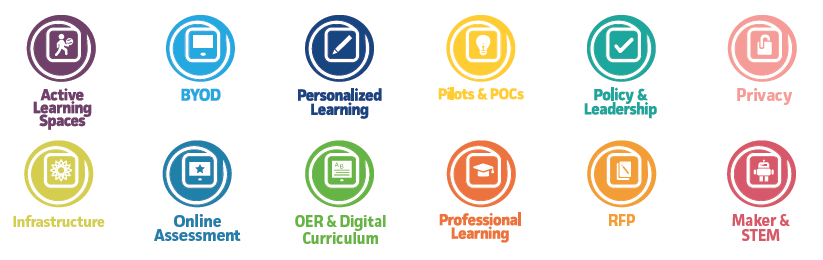
Here are the list of toolkits:


There are a ton of resources and information on this site - take a look around and see what it has to offer.

It is sponsored by Intel EducationTech&Learning, and Clarity Innovations.


Related:

Ed Tech Pilot Framework - excellent resources for all schools 

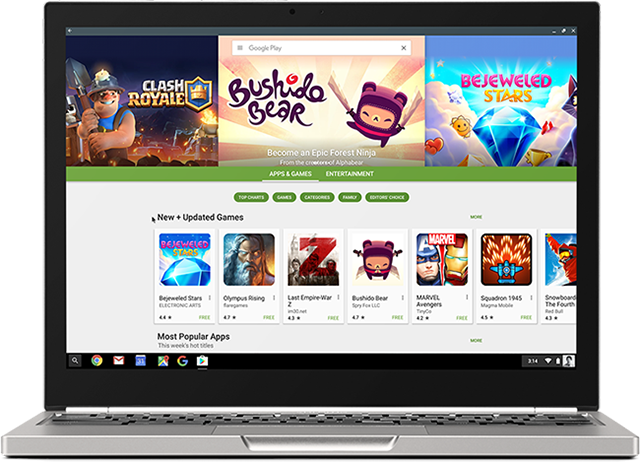
Android on Chromebooks! Here are some resources and apps to check out


Android has come to Chromebooks and is available on EDU Domains!


This opens up a whole new world of possibilities with Chromebooks, adding thousands of great apps, features and capabilities.


Here are the resources for Admins to get Android apps enabled for their domain:


Here are some great suggestions for Android apps (and some web apps):

F101_Pixel2_Silver_PlayStore.width-800.png

Android App Suggestions for Chromebooks (all are free)


I've been using Android apps on my Acer C738T with my personal account for quite a while now and they work great. Handwriting input, offline sync and much more. 


A new generation of Chromebooks, designed for millions of students and educators https://blog.google/topics/education/new-generation-chromebooks-designed-millions-students-and-educators/ (Acer and Asus convertible’s with stylus)

A new generation of Chromebooks, designed to work with millions of apps https://blog.google/products/chromebooks/new-generation-chromebooks-designed-work-millions-apps/ (Samsung Plus and Pro)


--

Wednesday, November 23, 2016

Ed Tech Pilot Framework - excellent resources for all schools


Digital Promise has released an EdTech Pilot Framework which provides a step-by-step process to help education leaders and technology developers run successful educational technology (ed-tech) pilots.

It is very simple to use and read and has links for more information on each step.

Here is the link to the original article: http://edtech.digitalpromise.org/

One thing to remember - you don't have to do these projects alone. There are plenty of resources available to help you. In addition, check with your technology vendors to see what they have for planning and support resources to help you.

Here is the Framework:


  1. Identify Need
  2. Discover and Select
  3. Planning
  4. Train and Implement
  5. Collect Data
  6. Analyze and Decide
  7. Negotiate and Purchase
  8. Summarize and Share


Related:

K-12 Blueprint site updated - resources for planning and implementing EdTech 
Tech&Learning - free Edtech magazine, website and resources for educators


-

Resources to find Funding for Schools and Technology


Schools are always looking for ways to find funding for projects, especially for technology. Here are some great resources that I have used in the past.


1. Edutopia - The Big List of Educational Grants and Resources - Get a roundup of educational grants, contests, awards, free toolkits, and classroom guides aimed at helping students, classrooms, schools, and communities. Check this page weekly to get the latest updates! https://www.edutopia.org/grants-and-resources


2. GetEdFunding - GetEdFunding is a free and fresh grant-finding resource, dedicated to helping educators and institutions identify the funding they need in budget-tight times. http://www.getedfunding.com/


3. Lowe’s Toolbox for Education http://www.toolboxforeducation.com/


4. Toshiba America Foundation grants – K-5 and 6-12 - http://www.toshiba.com/taf/


5. Device Grant Listed (list maintained by Google, has a lot of different grants listed) https://goo.gl/WD6YpS


6. THE Journal K-12 Grant Opportunities and Ed Tech Event Listings https://thejournal.com/articles/list/listings.aspx


7. Edsurge - Where to Find Money for Your School's EdTech Purchases https://www.edsurge.com/news/2016-11-21-where-to-find-money-for-your-school-s-edtech-purchases


More resources:
  • Federal grants from various agencies are listed at www.grants.gov
  • State and local grant opportunities can often be identified by state legislative offices. 
  • Micro-funding through school- and classroom-specific grants can yield substantial results. Often donors are willing to fund projects whose impact they can directly observe. Such organizations as Donors Choose, Class Wish, and Adopt-a-Classroom facilitate individual donations. 
  • Contact local businesses to see what programs they have available to support schools. 


Don't be scared to apply for a grant - you may just get it!


Good luck and happy hunting.


-


Monday, May 18, 2015

More Than a Tech - blog about leading a successful technology department in a public school district


I just found out about a new blog out there, More Than a Tech. The blog is about EdTech but especially about leading and managing an IT department in a public school district.

Topics being covered include EdTech Resources, Customer service, Ticket prioritization, Navigating the political landscape of a school district, Budgeting, Planning for the future and other topics.


I'm adding this to my Feedly account to follow along.

Check it out.


-

Friday, May 8, 2015

SAMR and Google Apps - great ideas and tips


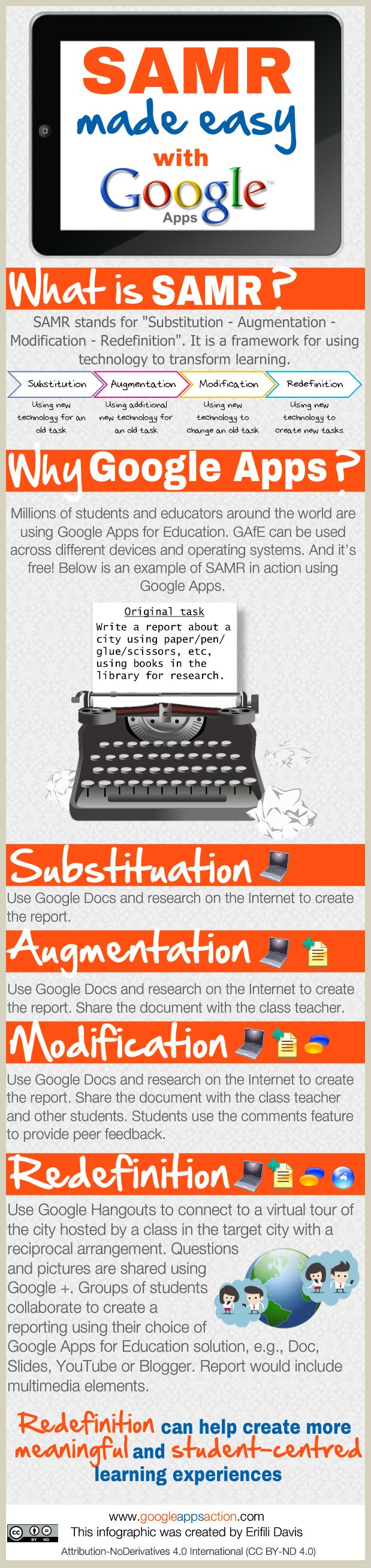
SAMR stands for “Substitution – Augmentation – Modification – Redefinition”. It is a framework for using technology to transform learning.

Substitution: Using new technology for an old task - good, but not the best way. For example, digital worksheets are still worksheets.

Augmentation: Using additional new technology for an old task - this can make some tasks better.

Modification: Using new technology to change an old task - this is good. Virtual labs for example can show students the theory and concept better than a physical lab.

Redefinition: Using new technology to create new tasks - this is great. Get students to collaborate, create, explore and solve problems.

Below is an infographic with some tips and ideas for using Google Apps with the SAMR Framework.


Google Apps and the SAMR Framework Infographic
Find more education infographics on e-Learning Infographics


Here's another graphic that illustrates SAMR well.


Related:

Google for Education Resources

Google Apps and Chromebooks Web App Recommendations - a whole lot!
The Benefits of Educational Technology


-

Monday, March 9, 2015

The Benefits of Educational Technology


Most of you reading this will agree that educational technology can help teachers and students - it provides benefits such as organization, efficiency, collaboration, communication, extra help, virtual experiences and so much more.


But, sometimes it's hard to convince others that the expense of technology is worth it and hard to show the benefits. Not everything in education is quantifiable.

Technology helps students:
  • they like it better than paper and pen
  • provides multimedia to address all learning styles
  • provides interactive, student centered activities
  • provides extra support and help resources
Technology helps teachers: 
  • organization and efficiency
  • paperless
  • finding lesson resources
  • collaborate with other teachers 
  • connect with parents

Here's an interesting article about this: Can tech help teachers teach and students learn?

Here's an older article I wrote about this: The How's, Why's and Value of Educational Technology - some really good info and examples here. 


--

Tuesday, March 3, 2015

EdTech Update - bringing the best news about EdTech to you


The State Educational Technology Directors Association (SETDA) and Aggregage are excited to announce the launch of EdTech Update. This new site and newsletter was created as a way to gather the best resources from hundreds of sources, including top bloggers such as Steve Anderson, Scott McLeod, EdFly, Christensen Institute, Digital Learning Now and many others.

The content is customizable by the user so that you only get what is the most interesting and relevant content for you. It looks at what you have selected, what you click on and share and then figures out what is most interesting to you. You can also personalize the content by using your LinkedIn profile, what you share on Twitter, what you click on either on the site or the newsletter, and what topics you
tell it are the most relevant based on your interests


There is a lot of great material and resources here - take a look. EdTech Update


--

The Evolution of Learning Technologies


Interesting timeline of the Evolution of Learning Technologies:

The Evolution of Learning Technologies
The Evolution of Learning Technologies | Open Colleges

--

Monday, March 2, 2015

Tech-It-Up Classroom - schools can win $100,000 worth of classroom technology


Tech-It-Up – The Sharp Classroom Technology Challenge, is a contest which will award more than $100,000 worth of classroom technology to K-12 Schools across the United States as a continued effort to support education technology.

Hosted by Sharp Electronics, one K-12 accredited school in the U.S. will win a grand-prize of $100,000 worth of state-of-the-art Sharp branded products for their classrooms, providing their students with a technologically advanced learning experience. Sharp will also award an AQUOS BOARD™ Interactive Display System to 10 runner-up schools.

For a chance to win, tell them how your school would integrate Sharp technology such as interactive whiteboards, professional display monitors and document systems (multifunctional copiers) to improve your students' educational experience. How would your students benefit by this award?

Schools will have until April 30, 2015 to enter; the winner will be announced on or about May 15, 2015. Entries must be submitted online: www.sharpusa.com/tech-it-up


-

Monday, December 1, 2014

Innovating Pedagogy Report released - some great information included


The Open University's annual 'Innovating Pedagogy' report has just been published. 2014 is the third year they have published the report, exploring innovations in teaching, learning and assessment. 

It has some interesting information and insight into some technology trends, including Flipped Classrooms, BYOD, storytelling and more. Take a look at here:


Friday, August 16, 2013

Class Dojo real-time behavior feedback platform Apps get updates


ClassDojo is a free online system that helps teachers promote positive behavior in their classroom by letting them track and share student progress and positive behaviors and areas of concern. It's easy to use and many teachers who use it have seen positive outcomes from using it with their students.


They had launched an iOS app this past September, and an Android app after that, to help teachers be able to use their tool while moving around the room, and even access it when not in the classroom. They have just announced an update to their iOS and Android apps to make them even better and more useful for teachers and students.


The full press release is below:


ClassDojo Mobilizes More Teachers to Build Students’ Character Anywhere with Version 2.0 of its Popular iOS and Android Apps

ClassDojo 2.0 now lets teacher manage, edit, share and sync up their students’ behavior reports from their mobile devices
SAN FRANCISCO – August 15th, 2013 - Today, ClassDojo, the free behavior development platform for teachers, students , and parents, is launching a major update - version 2.0 of its mobile apps for iOS and Android. ClassDojo, already used by over 15 million teachers and students in over 80 countries worldwide, will now offer teachers the full suite of ClassDojo’s web functionality on mobile devices, including setting up and customizing their classes, taking attendance, viewing progress reports, and inviting other teachers.

Download the iOS app here: www.classdojo.com/ios and the Android app here: www.classdojo.com/android

The original ClassDojo app was intended to be a lightweight ‘remote control’ for the website, making it easy for teachers to give students positive feedback on their behavior in real-time within their classroom. There were significant limitations, including the inability to customize classes, view reports or even set up a class. In effect, the app made teachers somewhat dependent on the web application to fully manage their classrooms. ClassDojo’s new iOS and Android apps will offer the full set of ClassDojo’s experience.

Now that roughly two in three teachers have a personal smart device, more teachers can access ClassDojo’s full set of experiences without using a laptop or desktop computer. For many teachers working at underfunded schools with limited school technology resources, this means for the first time they can use ClassDojo with their students to reinforce positive behaviors like persistence, curiosity, and teamwork - and indicates great promise for ClassDojo’s continued ubiquity.

The new version also allows teachers to give behavior feedback without needing to have a Wi-Fi connection (although they still need network coverage). This new feature meets one of teachers’ biggest needs: to be able to use ClassDojo in settings outside of the classroom - for example, in lunchrooms, the playground, on field trips, and even just in classrooms with poor Wi-Fi connections.

Today’s news reflects the company’s continued learnings about the ed-tech market. Classroom adoption of mobile devices is growing quickly, as is evident with the recent news that Apple partnered with the Los Angeles Unified School District to provide students 640,000 iPads. Accordingly, the company has built out its mobile capabilities to allow its mobile development to parallel its web efforts.

“For many teachers and in particular for students, education is now a ‘mobile first’ environment, and we’re excited that ClassDojo is leading the charge,” says Sam Chaudhary, co-founder of ClassDojo. “Our new mobile apps build upon our mission of helping teachers, parents, and students develop the behaviors and character strengths that are essential for lifetime success. Real-time reinforcement of positive behavior, especially when provided consistently across contexts, helps build the character strengths that influence students’ academic and lifetime success.”  

ClassDojo’s mission is to address the ‘other half of education’ that goes beyond just building good test scores, to actually helping students develop the character strengths that are essential for lifetime success. The company is a graduate of the ‘Y-combinator for education’, ImagineK12.

About ClassDojo:
ClassDojo is a real-time behavior feedback platform used by millions of teachers, students and parents to build specific positive behaviors like persistence, curiosity and teamwork at school. It helps teachers solve the most painful problem they face teachers: improving student behavior. It enables teachers to easily conduct their lesson and improve student behavior by providing students with visual and audio feedback triggered using a smartphone, tablet, or computer; it engages parents and students to effect changes in behavior outside of the classroom as well.

About the founders:
Sam Chaudhary worked as a high school teacher and McKinsey & Co education analyst, and has a degree in Economics from the University of Cambridge. Liam Don was an MMO game developer at Runescape (Jagex), and was doing a computer science PhD in Education Technology, which he left to start ClassDojo. ClassDojo was early-stage seed funded by the incubator ImagineK12.


TechForum Edtech Conferences coming up soon!

California: January 17
Atlanta: March 28
Boston: May 2
Chicago: May 9

Save the Date for Tech Forum 2014

Mark your calendars! Tech & Learning is bringing its groundbreakingTech Forum event back to Atlanta, Boston and Chicago for the winter/spring 2014 tour -- and we're kicking it all off in January with the newly added Tech Forum California, our return to the west coast due to popular demand!

• California: January 17, 2014
• Atlanta: Friday March 28, 2014
• Boston: Friday May 2, 2014
• Chicago: Friday May 9, 2014

Don't miss the chance to join T&L magazine for its annual high-end, information-packed one-day event designed especially for district and school administrators and technology leaders like you. This is your chance to network with others who care deeply about the future of education. Share your successes and address challenges in an engaging and intimate setting, and leave with practical tools and key contacts for continued rich communities of practice.

Follow us on Twitter for the latest updates, venue announcements, program content and speaker information!

Who Should Attend Tech Forum?

Tech Forum brings together some of the brightest minds and forward-thinking leaders involved in education technology. Each event is carefully designed for district- and building-level administrators,technology directorstechnology coordinators,IT managerslibrarians and media specialists,board of education membersmentor teachers and teacher trainers and anyone involved in the planning, decision-making and/or purchasing of technology for schools and districts.

Call For Presenters

Got a great idea for a session that is engaging and relevant to this audience of ed tech leaders? Know somebody who would make an outstanding presenter?Submit a proposal.

BROUGHT TO YOU BY:


How To Register


Online registration opens soon with a special offer to attend the day at a deep discount.

Livestream Archive


Take a look at some of the fantastic sessions from previous Tech Forums at our Livestream page.

Stay Up to Date


Manage Your Email Preferences/Unsubscribe
Change Your Email Address
To report abuse, click here.
You have received this message because you previously gave your email address to NewBay Media LLC.
© 2013 NewBay Media LLC, 28 East 28th Street, 12th Floor, New York, NY 10016 | 212.378.0400

LinkWithin

Related Posts Plugin for WordPress, Blogger...