Showing posts with label palm. Show all posts

Thursday, July 28, 2011

HP TouchPad Review


HP TouchPad tablet (webOS)
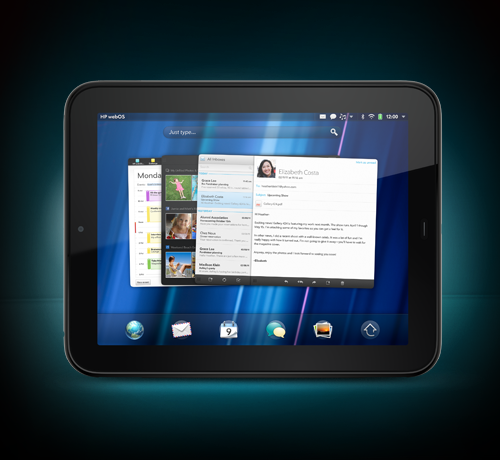
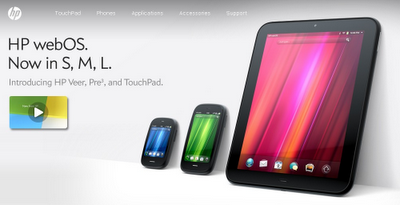
I have used webOS (yes, the “w” is lowercase) since getting my Pre+ smartphone in February of 2010 and love it. webOS has always gotten great reviews from technology writers and reviewers, but Palm never marketed it correctly. HP bought Palm in April of 2010, mainly for webOS, and promised to go all out with the operating system. They just launched the Veer (a very small, but powerful, smartphone) and the TouchPad tablet and the Pre3 is on the way. They are heavily marketing webOS and the new devices and have even talked about using webOS on full computers. 


I bought the TouchPad on the early launch day, July 1st and love it! I had a chance to use one at HP's booth at ISTE11 and loved it. Having been a webOS user for the last 2 years, using the TouchPad required almost no learning curve. It’s a little thicker and heavier than the iPad2, but not noticeable to me (I’ve used an iPad2 before and held one at the Best Buy store and compared them). It’s black and nice and shiny, which shows finger prints, but HP includes a nice cloth to wipe off the fingerprints that every touchscreen device gets. Currently there is only a WiFi version, but 3G versions are planned. You can also tether the TouchPad to your smartphone. The suggested retail price is 16GB for $499.99 and 32GB for $599.99, but most retailers are offering deals or lower prices. If you already own a webOS phone, you can get a $50 rebate when you purchase a TouchPad.


webOS is really easy to use and very intuitive, using cards (like windows or tabs) to do true multi-tasking. Setting up the device was a breeze, especially since it connected to my Palm (now HP) profile where my Pre+ data and settings was synced to and automatically brought in my apps and connections. The profile can be used on more than one device so a school could set up one profile to keep all of the devices set up the same.
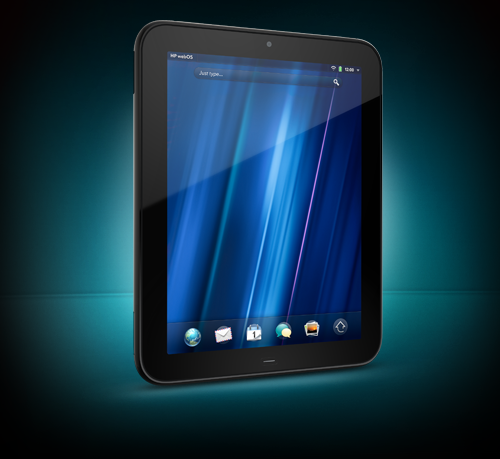
webOS and the TouchPad have some very cool features that make them very easy to use and very useful.

  • Technical Specs for the TouchPad:
    • webOS 3.0
    • 16GB or 32GB built in storage
    • 1.6 lbs, 0.54” thick x 9.45” long x 7.48” wide
    • Display - 9.7-inch, 1024 x 768 LCD capacitive touch (same as iPad2) - excellent viewing, even in sunlight
    • 1.2GHz Snapdragon processor paired with 1GB of RAM
    • 8-9 hours of battery life (continuous use - used mine on and off for three days without charging)
    • Micro USB port (for syncing files in USB drive mode or music using HP Play) and charging through the included charger (the Touchstone is a must-have accessory)
    • Front facing camera for video calls and video conferencing
    • Wi-Fi 802.11a/b/g/n radio, Bluetooth 2.1+EDR compatibility, a light sensor, accelerometer, compass, and gyro
    • Stereo speakers, headphone jack, power button, home button (can use gesture to get to home also), and volume buttons.
  • Virtual on-screen keyboard - easy to use, three sizes, and has a number row always visible.
  • There are thousands of apps for webOS and you can use the smartphone apps on the TouchPad. More apps come out every day. I can do everything I need to do. Amazon Kindle, QuickOffice, Facebook, Spaz (Twitter - similar to Tweetdeck), calendar, email, memos, Acrobat reader, Maps (Bing), Music, HP Movie Store, HP Play Music app, TapNote, Angry Birds, Pandora, Evernote, and much more.
  • Web browser supports Flash - and it works great. A huge number of website still use Flash and the browser lets you view these sites (unlike the iPad and iOS). This is important to me because many of the educational sites I use and virtual labs are Flash based. It’s also cool to watch YouTube videos on the YouTube page just like on your computer. It also allows you to watch Discovery Education Streaming videos right in your browser.
  • Google works - all of the Google applications I use work great in the browser including Docs, Blogger and Google+. No need for any special apps.
  • True Multi-tasking - webOS allows true multi-tasking using cards for each app (Iike a window). It’s extremely simple to view all open apps and select one or even close it using simple gestures. Apps run in the background just like on your PC. This makes it very easy to get work done and jump from app to app.
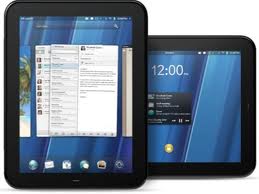

  • Synergy - syncs and brings together all your contacts from your email systems and even Facebook as well as your calendars.
  • Box.net - 50GB of free storage on Box.net
  • Messaging - natively supports Google Talk, AIM, Skype audio and video calls, Yahoo! Messenger and future third-party apps. TouchPad owners who also have a webOS smartphone can send and receive text messages from the application as well.
  • QuickOffice - view and edit office documents using QuickOffice. Links directly to Dropbox also.
  • Accessories
    • case with cover that folds as a support (similar to the iPads)
    • Touchstone charger - very cool - wireless charging - simply set your TouchPad (or webOS phone) on the Touchstone and it starts charging using inductive charging technology. It also automatically displays different things based on your selection, such as a clock or your agenda. I have it set as a clock on my desk

. 
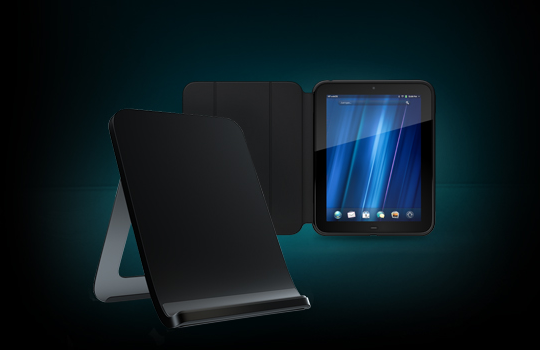
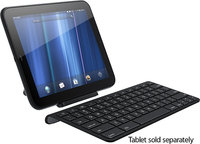
    • Wireless keyboard - connect via Bluetooth to the TouchPad. Set your TouchPad on the TouchStone charger and use the keyboard or bring the keyboard with you.
  • Email - allows multiple accounts, including Gmail and Exchange, and you can view all your inboxes together or separately.
  • Print wirelessly to compatible HP Printers
  • Large developer base and homebrew community. HP embraces “jailbreaking” which isn’t actually needed - and homebrew developers.
  • Notifications - notifications are unobtrusive and appear at the top of the screen. They do not interrupt what you are doing. Email, Facebook notifications, Twitter, and many other apps use the notification system.
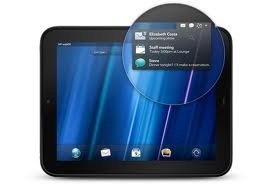

  • Just Type - just type on the main screen and it will search your apps, contacts, web history and Google for what you are looking for. You can even start an email or open othe apps from it.
  • Beats Audio - the TouchPad has Beats Audio which is a very impressive audio system. The built-in stereo speakers are excellent, but it sounds even better on your headphones.
  • Entertainment - TV shows, movies, and more through Hulu, HBO on the Go and more.
  • Connect to your webOS smartphone - the TouchPad can connect to your Veer or Pre3 (or other webOS smartphones) and you can access your text messages and even make phone calls on your TouchPad. Leave your phone on your charger and just use the TouchPad.
  • Touch to Share - just touch the Veer or Pre3 to the Touchpad and transfer what you were doing from one device to the other. For instance,  you are looking up directions or information on your TouchPad and then want to head out the door and leave the TouchPad at home. Just touch the phone to the TouchPad and transfer the website over to the phone.
  • Butler Service - free 90-day HP webOS Butler Service to help you setup and use your device.

Educational Use:
webOS is easy to use and allows multitasking. The browser supports Flash and works great with Google and other web apps. The TouchPad is sturdy and well built. There are tons of apps. Updates are done over the air so you don’t need to plug it into a computer. It Works Like Nothing Else. I really is a great device for education.


Best Resource for Everything webOS: Precentral.net - resources, reviews, tips, community forum, and much more.


Conclusion - I love webOS and think it is truly the best mobile operating system around. The TouchPad is pretty awesome and allows me to do everything I need to do with a computer, whether work, school, or fun. I highly recommend it as a tablet and I highly recommend checking out the Veer and Pre3 as smartphones. (I wrote this article in Google Docs and then posted it on Blogger all from my TouchPad).


Check out this in-depth review of the TouchPad for more: http://www.precentral.net/review-hp-touchpad

Check out this series of articles about a person who is only using a TouchPad for everything (since his house was burglerized and his laptop and TV were stolen). http://www.precentral.net/life-webos-and-webos-only


Related Articles:
7 Ways the TouchPad burns the iPad
Most used Apps on my Palm Pre+ and What I use them for
Educational Apps for webOS
HP Announces three new webOS devices
Analysis of webOS vs. iOS (iPhone)
HP Buys Palm - What could that mean for education?
Review of Palm Pre+ and Pixi+


(Disclaimer - I did NOT receive any compensation from HP for this review).


UPDATED: 


HP cancelled the TouchPad within a couple of months of launch and put it on a fire sale. Those of us that purchased it at full price ($499 - $599) were able to get a refund for the difference. The 32GB version was on sale for $149 and the 16GB at $99. (They have also cancelled the Veer and Pre3 smart phones and are open-sourcing webOS).


Purchasers who already owned a Palm webOS phone also got a $50 rebate and $50 in free apps, so my 32GB TouchPad only had an effective cost of $50. Not bad for a pretty awesome device.


There are not a lot of apps for the TouchPad, but it can run webOS phone apps, which there were a few thousand of, has a browser that can view Flash, and has some great apps available.


It can do everything I want it to. RSS Reader, Google+, Facebook, Twitter, Kindle app, office files with QuickOffice, web browsing, access all my Google apps, listen to music, and more. The Splashtop Remote Desktop app allows me to connect to my computer using my TouchPad and anything I could do on my computer, I can do on the TouchPad. This easily makes up for the lack of apps. I was watching Netflix on my TouchPad today and there is no app. I was using Splashtop Remote to access it on my computer.


I've also installed Preware, which is rooting or jailbraking, but encouraged by HP/Palm, not restricted. With Preware, I've installed a bunch of homebrew apps and patches that have made the TouchPad even better by optimizing the OS and speeding up the processor (to 1.5 GHz). It also has a save and restore app so that if HP ever shuts down the Synergy system, webOS users are all set.


I've used it in meetings and at conferences to take notes, access the internet and much more. I read books, watch movies, surf the web, access social networking, check my email, stay organized with my Google Tasks and Google Calendar (which are kept in sync with my Google account and on my Android smartphone), play some very cool games (including Angry Birds) and much more.


So, even though the device was cancelled, there is very little app support, and HP is not doing much with the software (besides open sourcing it), it is a great device. webOS is awesome and still has the best multi-tasking and notifications (better than Android or iOS5) and between the available apps, web browser and Splashtop remote, it does everything I need it to do.


Friday, February 18, 2011

Unfettered by Stuff - or "Why I don't lug stuff home every night"


It always amazes me at the amount of stuff some teachers seem to carry home every night and back into school the next day. They also are amazed at the fact that 95% of the time, I'm not carrying anything either way (except maybe my lunch). Two teachers asked me about this the other day and were shocked at why I don't have to carry things home to work on. I decided I'd also share that explanation here.

Most of what teachers are carrying with them is their grade book, lesson plan book, student work to grade, lesson resources, textbooks, and the like. I've been able to escape all of that because of my use of technology. Technology has saved me from carrying lots of things around (which is good since I have two herniated discs in my back - too many years as a paramedic). It's also part of my quest for going paperless, which is only hampered by student computer access.

Here's my list of tools, resources, and reasons why I don't have to carry stuff back and forth between home and school:

1. I teach science and use project based learning - there isn't much paper work for me to grade from my students. The only thing they don't do electronically is their problem sets and those I check in class. Their tests are paper based, but I correct those after school before going home. In rare occasions, tests are what I would be carrying home to finish grading. The lab reports, online work, and projects are all written up electronically and send to me either by email, DropItToMe or through another system. I can access this work anywhere, including on my smartphone, to review, grade and give feedback.

2. I don't use a textbook with the class, instead using online resources - I use digital resources with the class -Google Docs, Discovery Education, web sites, and class blogs. I have access to all of my lesson resources online. I do have some textbooks that I use for reference, but I have electronic versions, which have the textbook and all instructor resources in PDF form (thanks Glencoe and Holt!). I also have a hard copy of multiple physics textbooks at home that I can access if need be.

3. Cloud based computing and file storage - All of my resources are electronic. If they weren't created electronically, or available electronically, I scan them and save them as PDF files. I use Dropbox, Sugarsync, and Zumodrive to have all of my files and resources available to me at school, at home, via smartphone, or from any computer. I can grade work and give feedback, check and take notes, work on lesson plans, and much more from anywhere.

4. Cloud based apps - I rarely use computer based software anymore. I do have desktop versions of many things at home, but at school I use mostly web based apps. I use Evernote, Google Docs, Blogger, Google Sites, Gmail, TweetDeck and more to do my work. I can access my files and do my work anywhere, from any computer or smartphone. Evernote has my lesson plans, web clippings, notes from meetings, notes and ideas for lessons, reference information from school, and more. I scan in memos and documents and store many of them in Evernote for easy access and searching. I even take pictures of posters, notes on white boards, and such and upload the photo into Evernote for storage, accessibility, and searching.

5. Smartphone - I have a Palm (now HP) Pre+ smartphone. I love it. The calendar and contacts automatically sync with my Google Calendar and Contacts so I'm always updated. I can go online to any website for access to my data or to search the web. I have access to all three of my email accounts. Apps let me get tons of things done: Dropbox, Twitter, Google, Evernote, DocsToGo, and much more all allow me to do with my smartphone what I do with a computer. This means I don't need a notebook, date book, lesson planner, or grade book. Since all of those things are online, I can access them through apps on my smartphone or through a website. I can access student info, take notes in meetings, look up my schedule, answer a student question via email, and so much more. All with a device that fits in my pocket.

So, everything I use is available online, anywhere I go. 90% of student work is done and submitted electronically. All my resources are electronic and available to me anytime. Instead of carrying pounds of notes, books and student work with me, I carry a 138.5 gram (4.89 oz ) smartphone and let the internet carry everything else.


Thursday, February 10, 2011

HP Announces three new webOS devices


Yesterday, HP announced 3 new webOS devices. HP purchased Palm last year and has been working to release webOS, an excellent mobile operating system (IMHO) on new hardware. These three new devices are due out in the Spring.

Currently, there are 5 devices running webOS: Pre, Pixi, Pre+, Pixi+ and Pre 2. The new devices are a huge leap forward in hardware, and will be running webOS 2.0 or later.

The three new devices are:

Veer - mini smartphone - this smartphone, running webOS, is the size of a credit card. Early reviews show it is very usable and many people have said that smaller smartphones are needed.


Pre3 - The Pre3 takes webOS to new levels. 1.4GHz processor, improved version of webOS, larger screen and excellent hardware specs. It has a vertical slider keyboard, 5MP camera, front facing camera for video chat, and more. I have the Pre+ and absolutely love it. The Pre3 is even better and I can't wait to get one.


Touchpad - the first webOS tablet. It is beautiful looking, with some minor changes to the OS to make it work better on a tablet. Multitasking, inductive charging, Synergy, and so much more. This is going to be a great device for schools.


webOS is a pretty incredible mobile operating system. It has true multitasking with Card View, Synergy (all your data is backed up and pulled together from multiple sources onto your device), great apps, and is easy to work with. Notifications pop up on the bottom of the screen and do not interrupt what you are working on. webOS is great for individuals, education, and businesses.


The Touchstone charger that currently exists will work with the Veer and Pre3. A new Touchstone is available for the Touchpad also. The Touchstone is an inductive charger, meaning there is no plug to put into the phone. Simply sit the phone or tablet on the device and it starts charging. You can also program what you want the device to display when it is docked.


With the new devices, you will be able to easily work together with them. If your phone is docked, you can answer a call or text on the tablet. If you want to continue your work from one device to the other, you can simply tap the two devices together and they will transfer what you were working on.

webOS is a great operating system. Palm had problems with hardware and marketing, but HP has come out with incredible hardware and has the scope to really push webOS to the masses. HP also mentioned that webOS will be coming to printers, PCs and much more in the future.


For more information, details, reviews, and specs, visit the following sites:

1. http://www.precentral.net/ - the place to find out news, information and reviews on webOS products and software.

2. http://www.palm.com/us/ - HP/Palm's home site for webOS devices, apps and accessories.

3. http://h41112.www4.hp.com/promo/webos/us/en/index.html - HP webOS site

4. What HP/Palm Got Right (that Apple didn't)


Related Articles:

HP Buys Palm - What could that mean for education?

Educational Apps for Palm webOS

webOS vs. iPhone

Review of Palm Pre+ and Pixi+

Most used apps on my Palm Pre+ and what I use them for 

Monday, January 24, 2011

Blackboard Mobile App comes to webOS


Blackboard has released a mobile app on HP Palm's webOSBlackboard Mobile Learn works with Blackboard’s Web-based teaching and learning software. Given all the important and secure information in your school’s Blackboard system, Blackboard Mobile Learn must be enabled by your school before the app will work on your device. 


This is great news for users of Palm's Pre and Pixi smartphones running webOS who go to school where Blackboard is used. 


Other HP/Palm webOS apps for education.


(Info from Precentral.net


Saturday, May 1, 2010

HP buys Palm - What could that mean for education?

image from Precentral - http://www.precentral.net/


On Wednesday, April 28th, 2010, HP announced that they would buy Palm, the maker of webOS and the Pre/Pre+ and Pixi/Pixi+ smartphones.

Palm, the company that actually launched and popularized early smartphones with it's Treo line, had struggled for many years and then was buoyed up by the release of it's new operating system, webOS. webOS is well liked and critically acclaimed, being described as the most elegant, user friendly, smartphone OS out there. It's synergy system keeps users always up-to-date and in sync with other services. It is also the only one that does true multitasking. In spite of webOS's initial excitement, Palm was unable to capitalize on that and sales of their new smartphones have not been as good as they thought and the company has been struggling. Enter HP.

HP, one of the largest technology companies in the world and a major computer manufacturer, is planning on keeping webOS and most of Palm's team and run them as a separate business unit. They are planning to scale webOS across multiple platforms, and in interviews have discussed a webOS powered tablet and slate. HP's global scale and financial strength combined with Palm's webOS will allow HP to "participate more aggressively in the fast-growing, highly profitable smartphone and connected mobile device market."

So, what does this have to do with education? One, Palm's webOS is a great platform and easy to use. HP can expand the market of webOS further into education. HP is talking about new devices like tablets and slates which will be great for the education market. This also means more competition in the market place which benefits consumers by lowering prices. webOS is extremely easy to develop apps for. Most high school computer science students (and many other students) already know web languages, which is what webOS is based on. This means that students could develop their own apps for educational purposes. With HP backing webOS, we will also see more and more developers creating apps for it. Palm has great support for developers also. HP and Palm have some very talented developers and engineers and the combination of both should lead to some very innovative products in the future.

Palm and webOS already have a lot of great apps for education and more are available all the time. webOS is easy to use, powerful, has a great web browser, supports Flash, has thousands of apps, supports 3D graphics, has true multitasking, and is easy to develop for.

HP and Palm have always been good towards education and I don't see that changing. HP already is involved with education through partnerships, discounts on products, and resources for students and educators. HP has their Teacher Experience Exchange which has lesson plans, resources, discussions, and more for educators. HP also offers free online technology training for educators. Palm has the Palm Foundation which provides financial and product-donation assistance to high-quality, effective non-profit organization. Palm also encourages developers to create educational applications.

In short, I feel that HP's purchase of Palm will lead to many good things for education - a great operating system on new devices with great potential and use in education.


Thursday, March 11, 2010

More Educational Apps for Palm webOS


FOR EDUCATION


Palm's new operating system, webOS, is gaining more and more apps each day. While the iPhone and Android get the most media attention, Palm is slowly gaining share. Many teachers used Palm PDA's in class in the early part of decade. If they are looking for the same ease of use with increased productivity, functionality, and graphics, they should check out webOS on the Palm Pre and Palm Pixi.

Two new apps were released today that would be great for education:

1. Quizmine Math Reference - this app is a math reference app that allows you to get quick and easy access to math formulas from arithmetic, algebra, geometry, measurement, trigonometry and derivatives. $0.99
UPDATE: Quizmine also has a great Physics reference app too!

2. Soshiku - this app is a simple, but powerful tool for students to use to manage their classes and assignments. It will keep track of assignment due dates and will notify you by email or text message to remind you it is due. For each assignment, you can add notes, tasks, view attachments, and share messages with assignment partners. The app syncs with the free account on Soshiku.com. $1.99

And of course webOS phones have all the basic features:
contacts, email, excellent web browser with Flash support, text messaging, camera, phone, tasks, media players, note taking, and lots more, including Evernote, Twitter, Facebook and Google.

Some additional apps that are great for education:
Evernote - "remember everyting"
A+ Student Organizer - keep track of schedule, grades, calculate GPA, assignments, tasks
Flash Cards - create your own flashcards, download from site, or download user created
Easy Stopwatch - useful for keeping time and in science labs
Seismograph - show students how vibrations are recorded
Convert - unit conversion calculator
Newsfeed - RSS reader
pReader - ebook reader
Epocrates - excellent medical reference
Wapedia - encyclopedia
SciCalc - scientific calculator
Periodic Table - interactive periodic table of the elements
World Atlas - world atlas with data on countries and regions
Twee - Twitter app
AP Mobile - news from the Associated Press
New York Times - read the NYT

There are also apps to learn Spanish, a grade book app for teachers, math games, and much, much more.

And, you can use all of those older Palm OS apps (Centro, Treo, TX, T3, etc) by using the app "Classic" on the Pre or Pixi. It will then run the old Palm OS apps on the Pre or Pixi. Pretty cool!


Related Articles:
** Palm Apps for Education ** (really a companion to this article)


Thursday, March 4, 2010

An analysis of Palm webOS vs. iPhone


I just read an interesting feature on eWeek's website, 10 Features We Want to See in iPhone OS 4.0. They argue that while the iPhone is a great device, it is missing a few things. What really got my attention was that Palm's webOS on the Pre and Pixi have 6 of them and will have a 7th shortly (and has 2 that are very close to what they are looking for). Here's the list and which one's webOS has.

1. Multi-tasking - webOS has this. In fact, the slideshow has a Palm Pre as the picture for this slide.

2. Gaming integration - while webOS doesn't have a formal game system integrated, there are many excellent games, including 3D games, and developers have ported games from other systems into webOS.

3. Flash support in the browser - webOS 1.4 has support for this and Adobe will be releasing Flash for webOS in the next month or so. Apple says it is a security risk, but thousands of web sites use Flash so not having it limits the usefulness of the iPhone for web browsing.

4. User control - users can delete pre-installed apps (I've already deleted a couple). There is plenty of user control and customization available in webOS. The iPhone does not give you much control.

5. Improved File Management - neither system has a true file manager on the device, but there is a homebrew file manager for webOS. There is talk of a full file manager coming. webOS also allows you to use your Pre/Pixi as a USB drive, so any computer can act as a file manager for it.

6. Improved mail - the built in mail client for webOS is much better than the iPhone's, and there are some other mail clients available for webOS.

7. Built-in Social Networking - Palm has an official Facebook app that comes installed on the phones, and there are other social networking apps available for Facebook, Twitter, and Myspace.

8. Power Scheduling - webOS makes it very easy to turn Wifi, Bluetooth, or even your cellular radio off. There are also ways to schedule the radios to be on or off based on time of day. The newest release of webOS (v 1.4) has better automatic power management also.

9. iBooks - webOS does have some eReaders for it, but nothing like the one being developed for the iPad. Apple wins this one.

10. An improved App Store - webOS's App Catalog is easy to navigate and search, has different ways of browsing, and you can browse through the whole thing via the online App Gallery. Plus, Palm allows developers to offer home brew apps and apps via a web page instead of through the official App Catalog. All of these can be easy searched at PreCentral's App Gallery. Apple does have more apps for the iPhone (140K), but webOS has only been out since June 2009, and more apps are released every day. Yes, I would love to have some of the apps that are on the iPhone, but I love the webOS user interface and functions. And, most of what I do is online anyway.

Summary:
webOS has: 1, 4, 6, 7, 8, 10
webOS will have shortly: 3
webOS has a version of/kind of has: 2, 5

In conclusion, Palm's webOS has many great features that even the iPhone lacks. Palm just released webOS 1.4 last week. I can't wait to see what webOS 2.0 will have! Palm's webOS is a great platform that is easy to use, has a great user interface, great apps and functionality, and is easy to develop for. Look for more webOS devices in the future.

More information on webOS and Palm Pre and Palm Pixi


Palm's webOS and Pre and Pixi are great for teachers and students too! Check out the article below for more on this. (and there have been many new apps since that article was written).


Monday, February 8, 2010

Review - Palm Pre+ and Pixi+


(Disclaimer - I am not being compensated in any way by Verizon or Palm for this review. This is simply my take on a new smart phone and how I am using it in education).

I recently got a Palm Pre+ on Verizon. I have been a Palm user for over 10 years, starting with a Palm IIIxe, then T3, LifeDrive, TX, and Centro on Verizon. I've been anxiously awaiting the Pre on Verizon since it was announced by Palm back in January 2009. My wife got the Pixi+.

I'm not going to write a full review of the Palm Pre+ or Pixi+ because that's been done plenty of times (here is Precentral's Review). I'm going to discuss how Palm's revolutionary operating system (webOS) and the Pre are great for me as an educator.

For more in depth info on the specs of these phones you can go to Verizon's site, or Palm's site (Pre+, Pixi+).

Both phones run Palm's new operating system, webOS. WebOS is built on a Linux base and uses web technologies for programming. This means that it is very easy for people to develop apps for it. It allows for multi-tasking, which is unusual for a smart phone. The user interface is bright, easy to read, and easy to use. WebOS also has unobtrusive notifications of incoming calls and messages, allows you to sync and merge multiple accounts, contacts and calendars. It is very easy and intuitive to use with finger touches and gestures doing most functions. It also supports multi-touch gestures. WebOS's ability to multi-task is great, and all apps are handled as cards think "windows" on a PC. webOS also has "Universal Search". Simply start typing at the home screen and it will search your phone (contacts, calendar, etc) and the internet for the search term. It makes finding anything very easy.

The hardware is beautiful. The Pre+ looks like a black, smooth, pebble and fits nicely in your hand. Both the Pre+ and Pixi+ have rubberized backs to make sure they don't slip out of your hand.

The Pre+ has a larger screen than the Pixi+ and a slide out QWERTY keyboard. The Pixi+ is thinner and has a candy bar format with the QWERTY keyboard fixed in position. The Pre+ has 16GB of memory and the Pixi+ has 8GB. Both have Bluetooth and Wifi. They both have great web browsers, email systems, and MMS (text and picture messaging) and there are thousands of apps available for both phones. Both also have digital camera's and LED flashes. The web browser displays web sites just like your computer's browser does and then you can just zoom in on different parts of the page. This means no more "mobile" versions of web sites.

A very cool accessory is the Touchstone charger. The Pre+ simply sticks to this little round charger using magnets and the phone charges using inductive technology. When the phone is on the charger, the screen displays the time and any notifications.

I use my Pre+ every day in my job as an educator and it truly makes my life easier. When I wake up in the morning I go over to the phone on the charger and see what notifications I have (emails, texts, alarms and alerts). I can address those right away or just put them off until later.

I can quickly look at my calendar for the day (synced with my Google Calendar), check notes in Evernote, check my email, RSS feeds (Google Reader), Twitter and Facebook and get my self ready for the day. I also check the weather using the Weather Channel's free app.

I can use the built in Google Maps and GPS for directions and use the media player to listen to music, videos, or use a streaming music service like Pandora (free) to get some great music.

Once at school, I use it for appointments, reminders (memos), taking notes, checking email, RSS feeds, Twitter, Facebook and more from my Personal Learning Network. The multi-tasking feature means I can have apps open and running in the background while doing other things. I can even have multiple web pages open using different cards, just like I use multiple tabs on my computer. There is also a YouTube app for viewing videos. Full native Flash support is available now and the Flash app is scheduled for release by Adobe shortly. The ability to see Flash in the web browser is very important to me and education since many educational sites and science sites use Flash for demos, videos, and more. The updates are done over the air and can be automatic.

I have a scientific calculator and unit conversion app on it for use with my physics classes. I also use it to take notes, store my lesson plans, access student info and grades, and much more no matter where I am in the building.

The webOS and great hardware allow me to do so much of the things that I can do on my computer with my Pre+. It doesn't matter where I am in the school or what I'm doing, I have my files, a great web browser, email, and apps to get my work done.

I think it's a great smart phone for educators and it's just as good for students. Students can do research, take notes, go online, check email, and use tons of educational apps in their studies. (see the related article below).

The only downside to the phone is that it doesn't have the best battery life. UPDATE: The February update did bring enhanced battery performance and the battery can be switched by the user (unlike Apple products). The update to webOS 1.4 also sped up actions and applications and made a variety of other improvements.

The multi-tasking really makes things easy for me. I can have Pandora on playing music, and have multiple web browsers open, my URL shortener and a Twitter client and be able to post information to Twitter and my blog. Since all of the apps are running, there is no delay when switching from one to the other.

Overall, I am very impressed with the Pre+ (and my wife loves her Pixi+) and have found it to be a great tool for work and for fun. It is easy to use and very powerful.

I recommend it to anyone looking for a new smart phone or looking to purchase their first smart phone due to it's power, usefulness, and ease of use. The Pre+ and Pixi+ are available on Verizon Wireless and the original Pre and Pixi are available on Sprint.

It is also great for education. I'm hoping Palm will come out with a PDA version and maybe a netbook/tablet version with webOS. It is easy to use and powerful - perfect for students.

Related Articles:


LinkWithin

Related Posts Plugin for WordPress, Blogger...